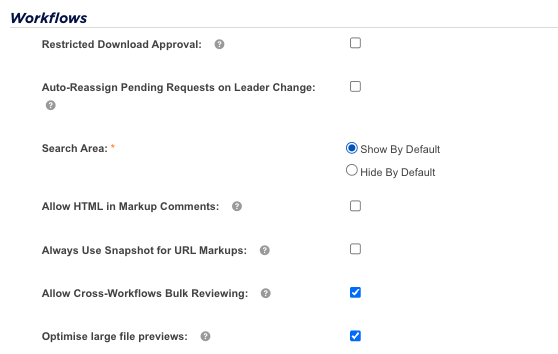
The Optimize large file previews setting helps reviewers open very large photography assets, such as camera RAW and TIFF originals, at normal speed in Approvals.
Table of Contents
What this setting does
Teams that work with commercial photography often review camera originals directly. A RAW or TIFF file straight off a shoot can run from a few hundred megabytes to well over a gigabyte. This setting makes sure reviewers can open those files quickly, so the review itself is never held up by file size.
With the setting on, IntelligenceBank prepares a compressed copy of each large image after it is uploaded. When a reviewer opens the approval, that copy is ready and loads straight away. The copy keeps the same dimensions as the original, so it is accurate for checking composition and content and for adding markup.
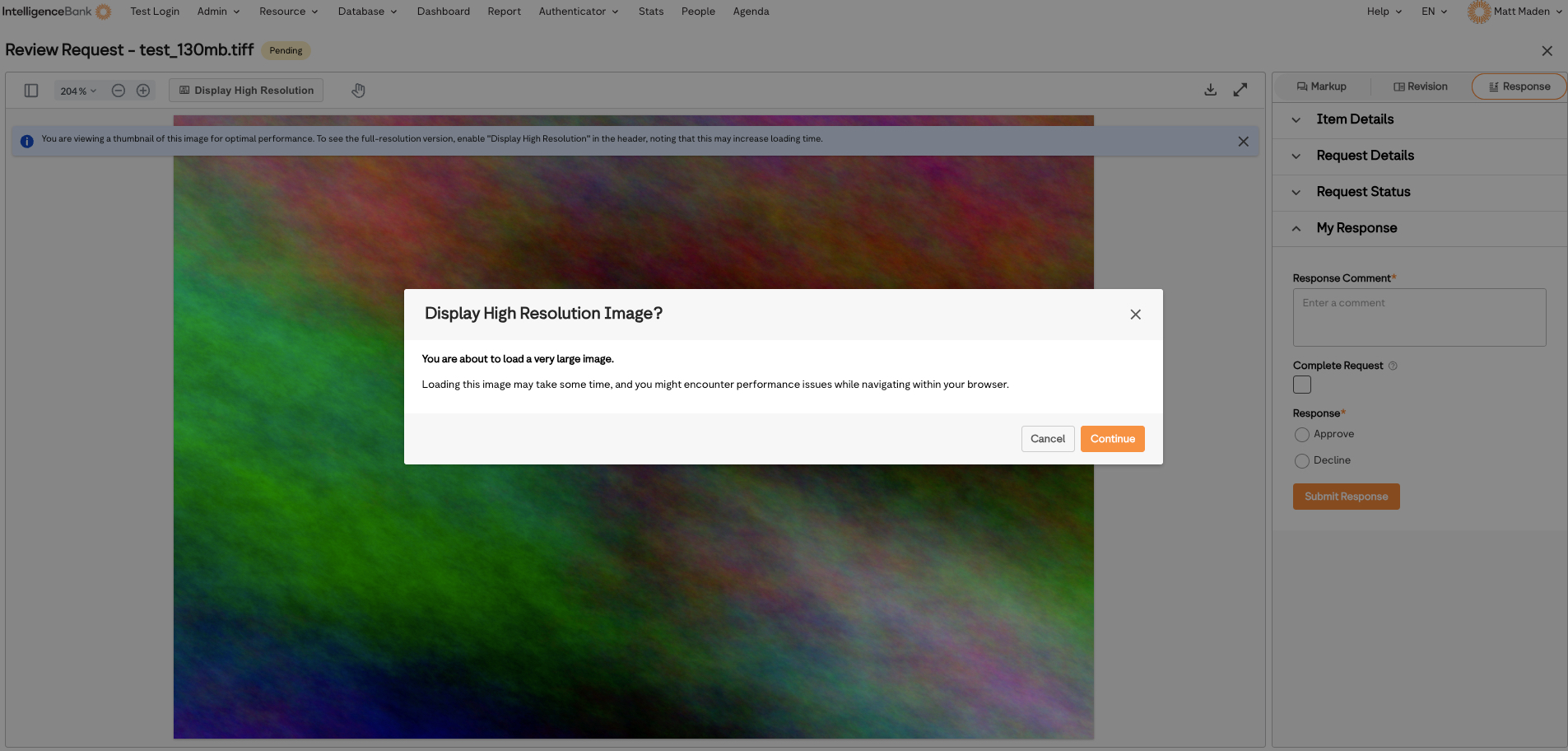
When someone needs to inspect the image at full quality, they can use the Display High Resolution toggle in the header of the review window to load the original.
| Which assets | Images of 100 MB or larger, with no upper limit. Smaller images already open quickly and are not affected. |
| Where it applies | The approval review screen, the download request review screen and markup comments. |
| Downloads | Unchanged. Downloading always gives you the original. |
| Your original | Never changed. The compressed copy is only used to display the image on screen. |
Turning the setting on or off
You need to be an administrator to change this setting.
| 1Open Admin | Go to Admin and open Settings. |
| 2Go to Workflows | Open the Workflows section and find Optimize large file previews. |
| 3Tick or untick | Tick the box to turn the setting on, or untick it to turn it off. |
| 4Save | Save your changes. |
What reviewers see
Most of the time the image simply opens. In a couple of situations reviewers will see one of the following.
| Message | What it means |
|---|---|
| You are viewing a thumbnail of this image for optimal performance | This banner appears above the image in the review window when the compressed copy is being shown. It confirms what you are looking at and how to see the full-resolution version. |
| Optimizing Image | The compressed copy is being prepared, usually because the asset was only just uploaded. The image appears automatically as soon as it is ready. |
| Image too large to optimize | A compressed copy is not available for this asset, so the reviewer sees the original. It takes a little longer to load, the Display High Resolution toggle does not appear, and review and markup work as normal. No action is needed. |
Reviewers who need full quality can turn on Display High Resolution in the header of the review window. The original loads at full size, so it takes longer for very large files. You will be asked to confirm before it loads, and it is best used when full-quality inspection is needed.
Frequently asked questions
| Is the reviewer looking at a lower quality image? | They are looking at a compressed copy at the same dimensions as the original. That is accurate for checking composition, content and markup. For pixel level inspection, they can turn on Display High Resolution. |
| Which file types does this cover? | Images of 100 MB or larger, including TIFF, camera RAW formats such as CR2, NEF, ARW and DNG, and PSD, PNG and BMP. |
| Do markups still work? | Yes. Markup works as it does on any other asset, and anything marked up appears in the right place. |
| Does this change the asset we download or approve? | No. The original is untouched and is still what gets downloaded and approved. |
| Why 100 MB? | It is the size at which a compressed copy starts to make a noticeable difference to opening speed. |
| Can we turn it on for some workflows only? | No. It is a single site-wide setting. |
Need help?
If you have questions about this setting or a large image is not opening as expected, contact IntelligenceBank Support.
Contact SupportWas this article helpful?
That’s Great!
Thank you for your feedback
Sorry! We couldn't be helpful
Thank you for your feedback
Feedback sent
We appreciate your effort and will try to fix the article