If you rely a lot on User As Group permissions to manage users' access to your content, you may want to set default permission rules so that whenever you enable the User As Group option on users, the required permissions on modules and rules are automatically applied to them. This allows you to manage users and permissions more efficiently.
To do so, it is recommended that you create a template group in the Admin>Groups area of the platform, whose default permission rules will be applied whenever a new user is enabled as User As Group.
Note: Only the default permission rules will be applied. Custom permissions to content such as folders, databases or custom pages will need to be applied separately at the user level.
Template Groups for Users As Group is set at the Division level (which means you can have a different template group for each division).
Enabling the Template Group
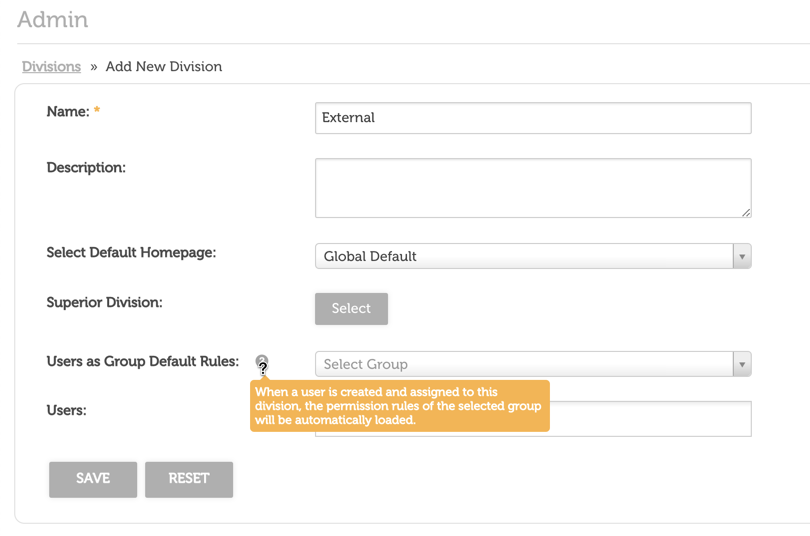
To enable this option, go to Admin > Divisions, and then edit the division you would like to set a default permission template on. You can then select the template group within the dropdown against the Users as Group Default Rules field.
Then, select Save to save the Division's settings.
Important: This feature is only supported on the initial 'User as Group' creation, ie: in the below scenarios:
- A new user is created and added into this Division which has 'Users as Group Default Rules' enabled, and is created as a 'User as Group'
- An existing user that is already in this Division is updated to be a 'User as Group' (for the first time)
Was this article helpful?
That’s Great!
Thank you for your feedback
Sorry! We couldn't be helpful
Thank you for your feedback
Feedback sent
We appreciate your effort and will try to fix the article