Installation instructions for the IntelligenceBank Assets Connector for Adobe Experience Manager as a Cloud Service.
Deploying to AEM Cloud
The recommended process is to have the released Connector package available in a Public/Password-protected Maven repository. IntelligenceBank uses a public Bitbucket repository: https://bitbucket.org/IB-IntelligenceBank/intelligencebank-connector-for-adobe-experience-manager-public/src/master/.
In order to deploy the Connector to your AEM as a Cloud Service instance, the following modifications should be applied to your pom.xml file:
1Define IntelligenceBank Maven repository
<repositories>
    ...
    <repository>
        <snapshots>
            <enabled>false</enabled>
        </snapshots>
        <id>central</id>
        <name>default-maven-virtual</name>
        <url>https://bitbucket.org/IB-IntelligenceBank/intelligencebank-connector-for-adobe-experience-manager-public/raw/master/releases</url>
    </repository>
    <repository>
        <snapshots/>
        <id>snapshots</id>
        <name>default-maven-virtual</name>
        <url>https://bitbucket.org/IB-IntelligenceBank/intelligencebank-connector-for-adobe-experience-manager-public/raw/master/releases</url>
    </repository>
</repositories>2Specify IntelligenceBank Connector dependency
<dependencies>
    ...
    <dependency>
        <groupId>com.intelligencebank.aem</groupId>
        <artifactId>aem-connector.all</artifactId>
        <version>2.X.Y</version>
        <type>zip</type>
    </dependency>
</dependencies>3Embed via filevault-package-maven-plugin
Configure filevault-package-maven-plugin to embed aem-connector.all into the deployment package, e.g.:
<build>
    <plugins>
        <plugin>
            <groupId>org.apache.jackrabbit</groupId>
            <artifactId>filevault-package-maven-plugin</artifactId>
            <extensions>true</extensions>
            <configuration>
                ...
                <embeddeds>
                    ...
                    <embedded>
                        <groupId>com.intelligencebank.aem</groupId>
                        <artifactId>aem-connector.all</artifactId>
                        <type>content-package</type>
                        <target>/apps/<...>/install</target>
                    </embedded>
                </embeddeds>
            </configuration>
        </plugin>
    </plugins>
    ...
</build>
Once the above configuration is performed, a regular Cloud Manager deployment will fetch the Connector dependency from the IntelligenceBank public repository and embed it into your deployment package.
Connector Configuration
Click here for configuration instructions.
Connector Logging
The Connector includes the following logger configuration:
{
  "org.apache.sling.commons.log.names": [
    "com.intelligencebank.aem",
    "org.apache.http.wire"
  ],
  "org.apache.sling.commons.log.level": "info",
  "org.apache.sling.commons.log.file": "logs/error.log",
  "org.apache.sling.commons.log.additiv": "false"
}
Connector messages are written to the standard AEM error.log, the only log file AEM as a Cloud Service keeps. To monitor the Connector, download or stream error.log from Cloud Manager and filter on com.intelligencebank.aem. Versions up to 2.1.12 wrote to logs/intelligencebank.log, which AEM as a Cloud Service does not retain.
WARN log messages indicate a recoverable error, while ERROR indicates a failure.Release Notes
Version 2.1.14 (29 September 2026)
- Built against the current AEM as a Cloud Service SDK (2026.9, previously 2020.11). No change to what the Connector requires from AEM.
- Removed the
bundle-unversioned-packageswarning from the Cloud Manager pipeline. The Connector bundle no longer exports its internal packages. - Removed a critical code quality finding in
DamPanelRenderCondition.
Version 2.1.13 (29 September 2026)
- Connector logs now go to the standard AEM
error.log. AEM as a Cloud Service ignores custom log files and log patterns, and its pipeline flagged both. - Fixed the API rate limiter holding a lock while waiting, which made concurrent sync threads queue behind each other.
- Fixed AEM Cloud Assets Sync runs failing with Connection reset. On AEM as a Cloud Service, a connection left idle between runs was dropped by the network, so every second run failed. Idle connections are now closed, and a request that lands on a dropped connection is retried once.
- Support for AEM 6.5 has ended. Version 2.1.12 is the last release that supports it.
- Test configuration now says which step failed and what to check: an address that is not an IntelligenceBank platform, a rejected login, or an error from a later call.
- Each AEM Cloud Assets Sync run now logs one summary line, for example
AssetSync completed in 4s: 12 found, 3 created, 1 updated, 8 unchanged, 0 failed, so you can follow the sync from AEM's logs.
Version 2.1.12 (1 May 2026)
- Addressed path-overlap warnings on
/apps/intelligencebank/classic-configand/apps/intelligencebank/osgiconfigcaused by a broad filter root in our all-container package that unnecessarily duplicated the scope already covered by the embedded ui.apps and ui.config sub-packages. The container's filter has been narrowed to only the embed install paths, following the modern AEM archetype pattern.
Version 2.1.11 (19 February 2026)
- Remove Google Guava 15.0 dependency (security vulnerability fix).
- Update brand logos and favicon.
- Replace Guava utilities with standard Java equivalents.
Version 2.1.10 (26 June 2024)
- Removed deprecated service user mapping format.
Version 2.1.9 (8 December 2023)
- Implements throttling for handling 429 Too Many Requests response as part of new API rate limits.
Version 2.1.8 (7 June 2023)
- Fix for loop scenario when multiple assets in scope have the same filename.
- Fix for "OakState0001: Unresolved conflicts" error.
- Fix for extension missing on download. This issue was introduced as a side effect of the fix for "Filename may contain forbidden characters, e.g. asterisk, and should be sanitized before attempting to create an asset" released in version 2.1.4. Unfortunately, there is no automatic fix for already synced assets, so impacted assets need to be removed and synced again for the extension to be saved correctly.
Version 2.1.7 (16 May 2023)
- Fix to handle unsupported characters (e.g. /) when creating dynamic Destination Folders based on a metadata field.
Version 2.1.6 (14 May 2023)
- Fix to tracking of Folder sync call so that the Adobe Experience Manager Connector is correctly identified as the source in Usage Reporting.
- AEM Cloud may run Author servers in a clustered mode, which can be causing excessive requests when every node tries to perform the sync. This fix ensures only 1 node (the leader) will trigger the update.
Version 2.1.5 (26 March 2023)
Address some of the warnings that may now be appearing during CI/CD pipeline quality check. Note that the outstanding warnings cannot be removed or suppressed any longer. Here is an explanation for the outstanding ones:
- The product interface com.day.cq.dam.api.Rendition annotated with @ProviderType should not be implemented by custom code. Detected in com.intelligencebank.aem.resource.VirtualAssetRendition contained in /apps/intelligencebank/application/install/aem-connector.core-2.1.4.jar.
The product interface com.day.cq.dam.api.Asset annotated with @ProviderType should not be implemented by custom code. Detected in com.intelligencebank.aem.resource.IntelligenceBankAsset contained in /apps/intelligencebank/application/install/aem-connector.core-2.1.4.jar.
These warnings indicate that the Connector is building on top of AEM APIs which are not guaranteed to be backward-compatible in future AEM releases. This results in a risk that we would need to adjust the connector to make it compatible with future AEM releases. This is expected. Since 2019, there has been no breaking changes released in said interfaces, so we estimate this risk as low. - PackageOverlaps — these warnings seem to be false-positives as we do not observe any overlaps in the codebase.
- /apps/intelligencebank/classic-config/servicepage-template is a Static Template under /apps. The use of Editable Templates is recommended.
Since the template in question is a Connector configuration page, it does not make sense to use editable templates in that circumstance.
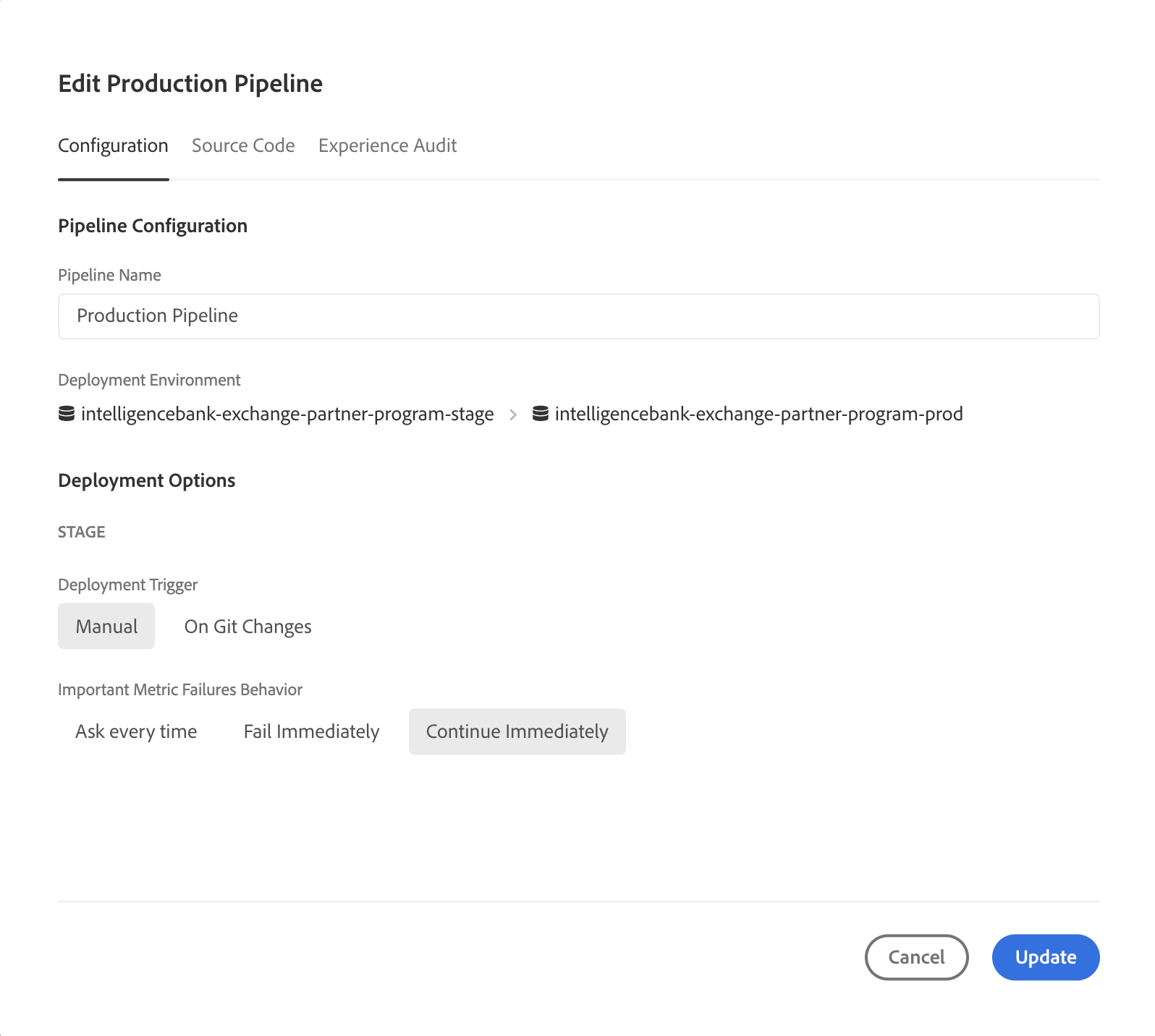
The deployment pipeline in Adobe Cloud Manager can be updated to ignore said warnings by selecting Important Metrics Failures Behavior → Continue immediately.
Was this article helpful?
That’s Great!
Thank you for your feedback
Sorry! We couldn't be helpful
Thank you for your feedback
Feedback sent
We appreciate your effort and will try to fix the article