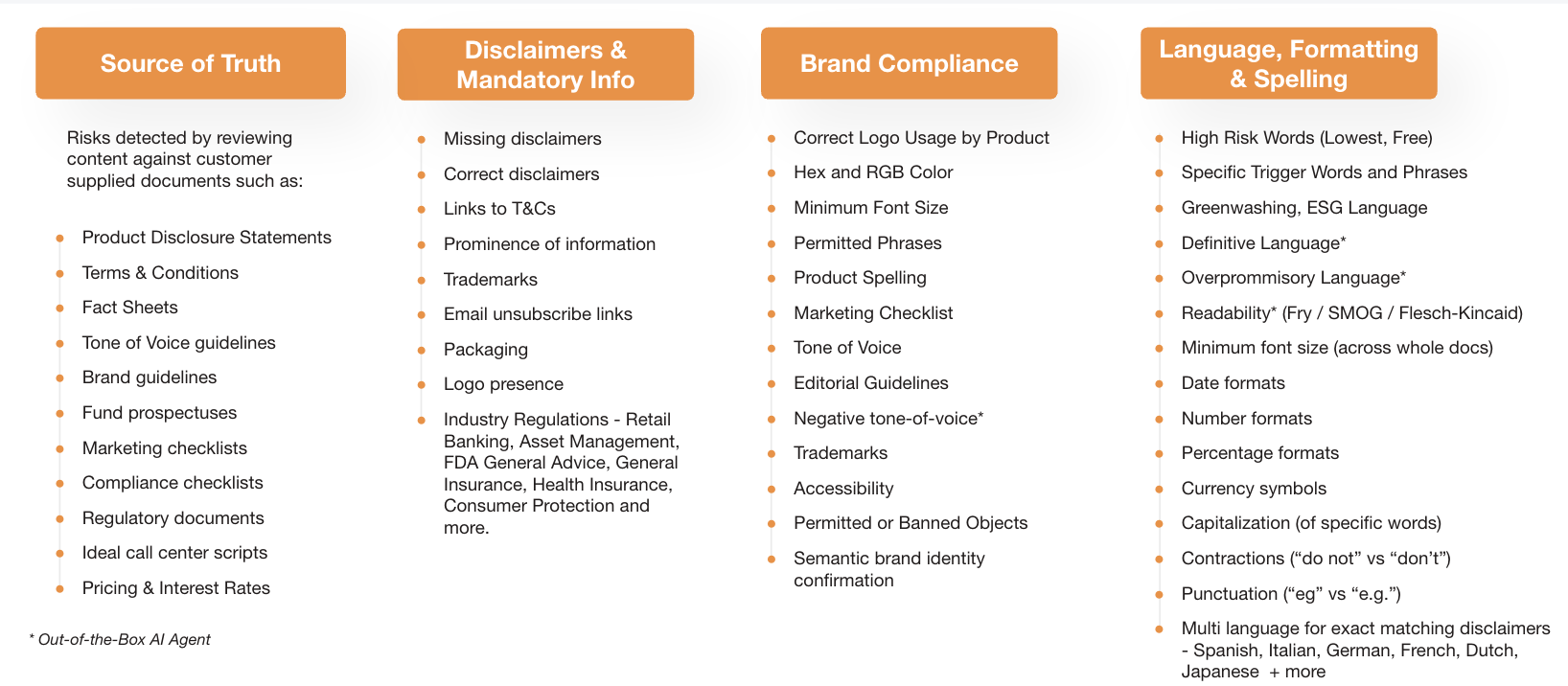
This article outlines IntelligenceBank's different risk review rule types and their capabilities.
Source of Truth
These checks compare your marketing content against a reference document you supply - a factsheet, a set of terms, a script - and flag anywhere the two disagree.
Product Disclosure Statements
| What it does | Checks that claims made in your marketing content match what's stated in your official Product Disclosure Statement (PDS), and flags anything that contradicts it. |
| How it works | You provide the text of your approved PDS along with a short instruction describing what should count as a mismatch (for example, differences in rates, fees, or eligibility). When content is reviewed, it's compared against that PDS text and any contradictions are flagged, quoting the exact wording and naming the PDS as the source. |
| Example | A flyer advertises a fee that isn't mentioned in the linked PDS, or states an eligibility rule the PDS doesn't support. The review flags the flyer text and points back to the PDS. |
Terms & Conditions
| What it does | Checks marketing content against your official Terms & Conditions and flags anything that contradicts them. |
| How it works | Works the same way as the PDS check above: you supply the T&Cs text once, and every asset reviewed against that rule is compared to it. |
| Example | A promotion claims "no minimum spend" while the linked T&Cs specify one - the review flags the claim and cites the T&Cs. |
Fact Sheets
| What it does | Checks a fund or product fact sheet against an approved reference version (a "golden source"), catching discrepancies down to minor wording differences. |
| How it works | An approved reference document is loaded once. New or updated fact sheets are compared against it, and any differences in figures or wording are flagged for a reviewer to confirm. |
| Example | A fund fact sheet is updated with a new performance figure that doesn't match the approved reference - the review flags the changed number. |
Tone of Voice guidelines
| What it does | Checks that written content matches your brand's tone of voice - for example flagging language that's too formal, too casual, or otherwise off-brand. |
| How it works | This can work by comparing content against a written tone-of-voice guideline document, or by giving the AI reviewer a set of approved example content to learn your style from. Either way, it flags language that doesn't fit. |
| Example | A guideline says to avoid overly formal language ("utilise" instead of "use") - content using the formal version is flagged with a suggested edit. |
Brand guidelines
| What it does | Checks content against your brand guidelines. Depending on how the guideline is written, this can mean text-based rules (comparing wording against a written guideline) or visual checks (comparing artwork against a brand guideline document - see "Semantic brand identity confirmation" and the logo/colour checks below). |
| How it works | Written brand rules are handled the same way as other document comparisons above. Visual brand guidelines (logos, colours, layout) are handled by the dedicated logo, colour, and visual comparison checks described in the Brand Compliance section. |
| Example | A guideline states the brand name should always appear in full, never abbreviated - content using an abbreviation is flagged. |
Fund prospectuses
| What it does | Checks marketing content against an approved fund prospectus and flags contradictions. |
| How it works | Works the same way as the other document-comparison checks above - the prospectus text is loaded once and used as the reference for every asset reviewed. |
| Example | Marketing describes a fund strategy in a way that doesn't match the prospectus's stated investment objective - the review flags the discrepancy. |
Marketing checklists
| What it does | Not a single check - a marketing checklist is usually broken down into several individual rules (one per checklist item), so a full checklist might combine document-comparison checks, required-word checks, and AI judgement checks together. |
| How it works | Each line of the checklist is turned into its own rule of the most suitable type. There isn't one "checklist" feature; it's assembled from the other capabilities in this document. |
| Example | A checklist item "must include a call to action" becomes an AI-judgement rule; "must include the risk disclaimer" becomes a disclaimer rule; "must not say 'guaranteed'" becomes a required/banned word rule. |
Compliance checklists
| What it does | Same as marketing checklists above - usually assembled from IB's pre-built regulatory rule sets rather than being one single feature. |
| How it works | Individual checklist requirements are mapped to the most appropriate existing rule type, often drawing on the regulatory rule libraries covered under "Industry Regulations" below. |
| Example | A compliance checklist requiring a specific risk warning on all promotional material is delivered as a disclaimer rule, not a standalone "checklist" rule. |
Regulatory documents
| What it does | Checks content against a regulatory document you supply, or draws on IB's pre-built rule libraries for common regulations (see "Industry Regulations" in the next section for what's currently available by market). |
| How it works | If you supply your own regulatory document, it's used the same way as a fact sheet or PDS reference. Where IB already has a pre-built rule set for a regulation, that can be applied instead of building one from scratch. |
| Example | A client operating under EU marketing rules uses IB's pre-built EU rule set rather than uploading the regulation text themselves. |
Ideal call center scripts
| What it does | Checks that a call centre transcript or script follows an approved reference script. |
| How it works | An approved script is loaded as the reference document, and transcripts (or written scripts) are compared against it, flagging deviations. |
| Example | A call transcript omits a required disclosure that appears in the approved script - this is flagged for review. |
Pricing & Interest Rates
| What it does | Checks pricing and rate claims in marketing content, either against a reference document (if the current rates are held in one) or by checking the format a rate is written in (for example, "5.25% p.a."). |
| How it works | If a reference document holds the current rates, this works like the other document-comparison checks. Checking that a rate is formatted correctly is a separate, more mechanical check that doesn't need a reference document at all. |
| Example | A flyer advertises "3.5% p.a." but the approved current-rates document says 3.1% - the review flags the mismatch. |
These checks make sure required legal wording (disclaimers, disclosures, warnings) is present, correctly worded, and clearly displayed - plus a few other "must include this" checks.
Missing disclaimers
| What it does | Flags content where a required disclaimer isn't present at all. |
| How it works | You set up trigger words or phrases that create the obligation (for example, any mention of "past performance"). If content contains a trigger but no version of the approved disclaimer wording, it's flagged as missing, and the reviewer is shown the wording that should be added. |
| Example | A brochure mentions fund performance but includes no risk warning at all - flagged as "Please include the following disclaimer: …". |
Incorrect disclaimers
| What it does | Flags content where a disclaimer attempt is present but doesn't closely enough match the approved wording. |
| How it works | The same trigger-word setup as above is used, but this time some version of a disclaimer is found - it's compared against the approved wording, and if it's close but not close enough, it's flagged as needing correction rather than missing entirely. Minor formatting differences (like "5%" vs "5 per cent", or date formatting) don't count against it. |
| Example | A brochure includes a shortened or reworded version of the risk warning - flagged as "Please update your disclaimer with the approved version", rather than treated as if no disclaimer exists. |
Links to T&Cs
| What it does | There's no single dedicated feature for this yet - it's achieved by checking for the presence of a link (optionally matching a specific web address pattern), or as a required-phrase check. |
| How it works | A rule can be set up to require that a link matching a pattern (e.g. your T&Cs page) appears in the content, and flag content where it's missing. |
| Example | A digital ad with no link to the full terms and conditions is flagged as missing a required link. |
Prominence of information
| What it does | Checks that a disclaimer or disclosure is displayed clearly enough - for example, not shown in a much smaller font than the surrounding text. |
| How it works | Font size (and optionally bold/italic/underline styling) of the disclaimer is compared against the surrounding body text. This check depends on being able to read font information from the file, so it can't run on a flattened image with no underlying text formatting. |
| Example | A disclaimer is technically present and correctly worded, but shown in 6pt text against 14pt body copy - flagged for insufficient prominence. |
Trademarks
| What it does | Checks that trademark symbols (™, ®) are used where required. |
| How it works | This is a required/banned word style check rather than a dedicated trademark engine - it looks for the presence (or absence) of the correct symbol next to a brand or product name. |
| Example | A product name that should always carry ® appears without it - flagged for review. |
Packaging
| What it does | Not a standalone feature - where packaging needs to be checked, it's handled as a visual question about the pack artwork (see "Permitted or Banned Objects" in Brand Compliance). |
| How it works | A photo or artwork of the pack is reviewed against yes/no questions you define, such as whether a specific warning or logo appears on the pack. |
| Example | "Does this page show the product pack with the health warning visible?" - flagged if the answer is no. |
Logo presence
| What it does | Checks whether your logo appears where it's required, and flags content where it's missing. |
| How it works | The same logo-detection capability described under "Correct Logo Usage by Product" (Brand Compliance) includes a setting for what should happen if no logo is found at all - flag it, or ignore it, depending on whether the logo is mandatory for that content type. |
| Example | A rule requires the logo on every page; a page with no logo detected is flagged as missing. |
Industry Regulations (Retail Banking, Asset Management, General Insurance, Health Insurance, Consumer Protection, and more)
| What it does | IB maintains pre-built rule sets mapped to specific regulations, organised by market and industry, so clients don't have to build these from scratch. |
| How it works | A pre-written set of rules for a given regulation (with a citation and link back to the source regulation) is applied to your content. Some rules need a small amount of client-specific customisation (like your entity name) before they go live; others are ready to use as-is. |
| Example | An EU asset management client uses a pre-built rule based on ESMA marketing guidelines that flags overly persuasive or hyperbolic language ("revolutionary", "the best", "life-changing") and cites the regulation in the finding. |
Brand Compliance
These checks confirm your logo, colours, fonts, wording, and imagery all match your brand standards.
Correct Logo Usage by Product
Currently this capability would be set up as one logo per rule - if you have several logos to check, each needs its own rule.
| What it does | Finds your logo in an image or document and confirms it's the correct, approved version for that product - flagging outdated versions, unapproved variants, or missing logos. |
| How it works | You describe what the logo looks like, and the reviewer finds every place it appears. Each detected logo is then checked against a set of yes/no questions describing your approved variants (for example, "is this the base logo with no modifications?"). You can control which pages this applies to, and what should happen if the logo is missing or doesn't match any approved variant. |
| Example | A flyer uses an old version of the logo. The reviewer detects a logo but it doesn't match any approved variant, so it's flagged as "Logo was found but did not match any approved variant." |
Hex and RGB Color
| What it does | Checks that brand colours used in artwork match your approved palette, described by hex codes and their brand names. |
| How it works | Your palette is set up as named colours (e.g. "Navy Blue, #001441, also called TAB Navy") grouped into primary/secondary sets, with plain-English rules written against those names (e.g. "the primary colour should be dominant"). Colours are then sampled from the artwork and checked against those rules. |
| Example | A brand rule says only secondary-palette colours may be used in a specific execution; artwork using an unapproved colour is flagged. |
Minimum Font Size
| What it does | Flags text that's smaller than a required minimum size. |
| How it works | There are two versions: a whole-document minimum size check, and a check that compares a specific piece of text (like a disclaimer) against the size of surrounding body text (see "Prominence of information"). Both rely on being able to read font size from the file, so they don't work on flattened images with no text formatting. |
| Example | A document sets an 8pt minimum; any text smaller than that is flagged. |
Permitted Phrases
| What it does | Checks that only approved wording is used for specific phrases, and flags anything that doesn't match. |
| How it works | For exact required wording, this is a straightforward word/phrase match. Where you want to catch phrases that mean the same thing even if worded differently, a more flexible "same meaning" check can be used instead. |
| Example | A rule requires the exact phrase "terms and conditions apply" - a variation like "T&Cs apply" is flagged for review. |
Product Spelling
| What it does | Checks that product names are spelled and capitalised correctly wherever they appear. This is not a general spellchecker - it only checks the specific product names you configure. |
| How it works | A list of your approved product names (and how they should be written) is checked against the content, flagging any variation. |
| Example | "eSaver" is written as "Esaver" or "E-Saver" - flagged as an incorrect product name format. |
Marketing Checklist
| What it does | Same as the Marketing Checklists item in Source of Truth - not one feature, but a checklist broken down into several individual rules of the appropriate type. |
| How it works | See "Marketing checklists" above. |
Tone of Voice
| What it does | Same capability as "Tone of Voice guidelines" in Source of Truth - checks content against your brand voice and flags language that's off-brand. |
| How it works | See "Tone of Voice guidelines" above. |
Editorial Guidelines
| What it does | Checks written content against your editorial style rules - things like preferred spelling conventions, punctuation style, or writing conventions. |
| How it works | Handled the same way as tone-of-voice checks: either compared against a written style guide, or checked against specific rules you define (see "Contractions" and "Punctuation" in the Language section for examples of the kind of specific rules this can include). |
| Example | A style guide says to always use "email" not "e-mail" - content using the hyphenated form is flagged. |
Negative tone-of-voice
| What it does | A ready-made check (no setup required) that flags language with an unintentionally negative or off-brand tone. |
| How it works | This uses the same AI-judgement approach as the general tone-of-voice check, but comes pre-written and ready to use rather than needing you to supply your own brand guideline first. |
| Example | Content reads as unnecessarily blunt or discouraging in a way that doesn't fit a brand's typically warm tone - flagged for a tone review. |
Trademarks
| What it does | Same capability as "Trademarks" in the Disclaimers & Mandatory Information section - checks trademark symbols (™, ®) are used correctly. |
| How it works | See "Trademarks" above. |
Accessibility
| What it does | Checks that text is readable against its background colour, based on standard accessibility contrast guidelines (WCAG). This is a contrast check specifically, not a full accessibility review of a document. |
| How it works | As part of the colour-checking capability, the colours used for text and background are sampled and the contrast between them is measured against standard accessibility thresholds. |
| Example | White text on a light yellow background fails the minimum contrast requirement and is flagged. |
Permitted or Banned Objects
| What it does | Checks whether specific objects or imagery appear in a piece of content - for example spotting banned imagery, or confirming a required object is present. |
| How it works | Each page or image is checked against a list of yes/no questions you define (e.g. "does this contain alcohol imagery?"), each with its own explanation shown to the reviewer if it's flagged. |
| Example | "Does this page contain gambling-related imagery?" is flagged with the note: "Please ensure all gambling marketing complies with applicable advertising standards and regulations." |
Semantic brand identity confirmation
Because this relies on overall AI judgement across a whole guideline document, it's best used as a supporting sense-check alongside the more specific logo/colour rules, not as a stand-alone pass/fail gate.
| What it does | Compares an asset directly against an uploaded brand guideline document to assess whether it feels visually on-brand overall - the closest thing to a general "does this look right for our brand?" check. |
| How it works | A brand guideline document is uploaded to the rule itself, and the reviewer compares the artwork against it visually, alongside any text and links in the content. |
| Example | An ad uses off-brand imagery style or layout that doesn't match the uploaded brand guideline - flagged as inconsistent with brand identity. |
These checks cover specific words and phrases to flag, along with formatting conventions like dates, numbers, currency, and disclaimer language in other languages.
High Risk Words (e.g. "Lowest", "Free")
| What it does | Flags specific words that are commonly risky when used near a product or service claim, such as "lowest", "best", "guaranteed", or "free". |
| How it works | You (or IB) maintain a list of words to flag. Content is checked against that list and any match is flagged for review. |
| Example | "Get the lowest rate on the market" is flagged for using an unqualified superlative claim. |
Specific Trigger Words and Phrases
| What it does | Same mechanism as High Risk Words, but for any custom list of words or phrases specific to a client or regulation. |
| How it works | See "High Risk Words" above - this is the same underlying check applied to a different word list. |
Greenwashing, ESG Language
| What it does | Flags environmental or sustainability claims that may be overstated or unsubstantiated ("greenwashing"). |
| How it works | This uses a ready-made AI judgement rule (in some markets, based on specific guidance such as the US FTC's Green Guides) rather than a fixed word list, so it can catch claims phrased in different ways, not just specific banned words. |
| Example | "100% environmentally friendly" with no supporting evidence is flagged as a potential greenwashing claim. |
Definitive Language
| What it does | A ready-made AI check that flags language stating something as an absolute fact or certainty when it should be qualified (e.g. future predictions stated as guaranteed outcomes). |
| How it works | Uses AI judgement rather than a fixed word list, so it can catch a range of ways of stating something too definitively, not just specific phrases. |
| Example | "This investment will double in value" is flagged as an unqualified, overly definitive claim. |
Overpromissory Language
| What it does | A ready-made AI check that flags language making promises or guarantees that may not be appropriate or supportable. |
| How it works | Same approach as Definitive Language above - AI judgement rather than a fixed word list. |
| Example | "You're guaranteed to save money with this plan" is flagged as an overpromissory claim. |
Readability (Fry / SMOG / Flesch-Kincaid)
| What it does | Scoring all document content against standard readability formulas to check whether it's written at an appropriate reading level. Can present all Fry/SMOG/FK scores, or you can opt to display just FK. |
| How it works | This is a document-level deterministic Readability rule that delivers a readability assessment base on Flesch-Kincaid. |
Minimum font size (across whole docs)
| What it does | Same capability as "Minimum Font Size" in Brand Compliance - flags any text in a document smaller than a set minimum size. |
| How it works | See "Minimum Font Size" above. |
Date formats
| What it does | Checks that dates are written in an expected format. |
| How it works | Dates are automatically recognised in the text (including in several languages, not just English) and can be checked against a required pattern. |
| Example | A rule expecting DD/MM/YYYY flags a date written as MM-DD-YY. |
Number formats
| What it does | Checks that numbers follow an expected format. |
| How it works | Numbers in the text are matched against a required pattern (for example, comma-separated thousands). |
| Example | "1000000" is flagged where the house style requires "1,000,000". |
Percentage formats
| What it does | Checks that percentages are written in an expected format, including recognising different regional and language variants (e.g. "per cent", "procent", or Japanese percentage notation). |
| How it works | Percentages are automatically recognised in the text and checked against a required format. |
| Example | "five per cent" is flagged where the house style requires the "5%" symbol form. |
Currency symbols
| What it does | Checks that currency amounts use the correct symbol or code, including support for multiple currencies and languages (e.g. $, £, €, ¥, and Japanese amount notation). |
| How it works | Currency amounts are automatically recognised in the text and checked against the expected symbol or format for that market. |
| Example | An amount written as "100 dollars" is flagged where the house style requires the "$100" symbol form. |
Capitalization (of specific words)
| What it does | Checks that specific words are capitalised the way your style requires. |
| How it works | A word or phrase list is checked with attention to capitalisation, flagging any version that doesn't match the required style. |
| Example | A brand name that should always be capitalised ("MyBrand") is flagged when written in lowercase. |
Contractions ("do not" vs "don't")
| What it does | Checks whether contracted or non-contracted forms of words are used according to your style preference. |
| How it works | This is handled as a wording/style check rather than a dedicated grammar feature - it flags the form that doesn't match your preferred style. |
| Example | A formal-tone brand style requires "do not"; content using "don't" is flagged. |
Punctuation ("eg" vs "e.g.")
| What it does | Checks that specific punctuation conventions are followed. |
| How it works | Handled as a wording/pattern check for the specific punctuation style you require, rather than a general grammar or style-checking engine. |
| Example | House style requires "e.g."; content using "eg" or "ex." is flagged. |
Multi-language exact-matching disclaimers (Spanish, Italian, German, French, Dutch, Japanese + more)
Currently supported languages: English, French, German, Italian, Spanish, Dutch, and Japanese.
| What it does | Reviews required disclaimer wording in languages other than English, so you can check multi-language marketing the same way you check English content. |
| How it works | You (or your local team) supply the approved disclaimer wording in each language you need - IB does not translate the wording for you; it checks what you provide. The match is close-wording based (like the English disclaimer check) and doesn't require a byte-for-byte identical match, so minor formatting differences don't cause a false failure. |
| Example | A French-language brochure is checked against a French disclaimer your team has approved and supplied, the same way an English brochure is checked against the English version. |