This guide explains the different types of risks that can be identified in your content by IntelligenceBank's Marketing Compliance/Content Risk Review features and how to review these risks effectively.
Table of Contents
Accessing Review Results
- Once your content has been uploaded and the risk review is completed, click on the General Markup Comments icon next to the content you want to review in the Multi-Upload field of your record, or click on the Markup Tab, if reviewing risks within an approval request. For more information on how to submit your content for risk review, please read our article on Submitting Content for Marketing Compliance Review.
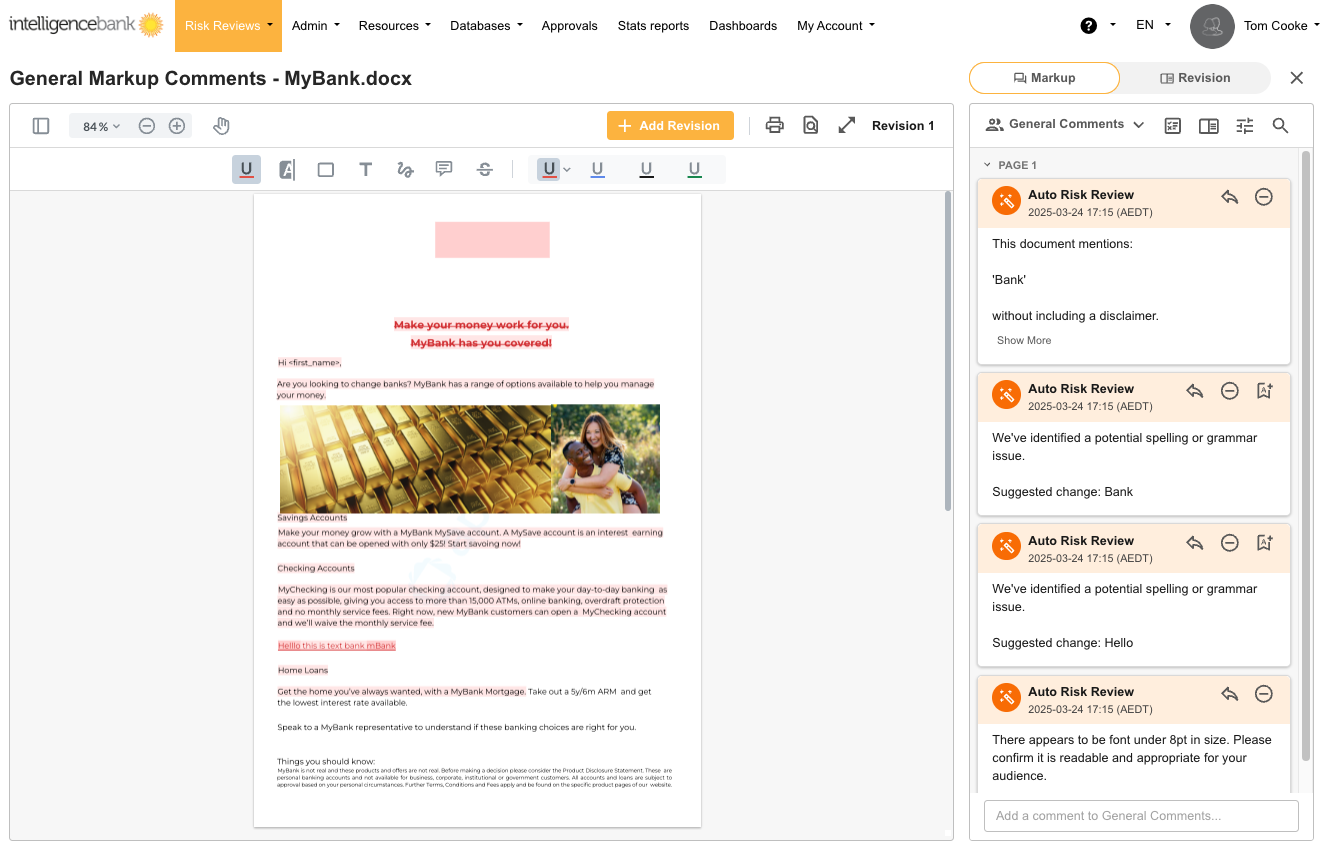
- The content viewer will appear with the markup panel on the right
- Identified risks will be highlighted in the content and listed in the comments section
- Click on any Auto Risk Review comment, and you will navigate directly to that corresponding area of the content. The specific risk that was flagged will be outlined in a bounding box.
Key Terms in Risk Reviews
| Rules | Automated compliance requirements built into Marketing Compliance. These rules are developed with your organization's specific requirements in mind, during your implementation process |
| Trigger | Language in a piece of content (or perhaps missing language) that alerts the system to flag a potential compliance risk |
| Feedback | The message within the Auto Risk Review comment that explains the risk and potentially suggests the action that should be taken to remedy a potential compliance risk |
| Dismiss | Option to indicate that you don't consider the flagged risk to pose a true compliance risk |
| Annotation | The highlighted annotation linked to the risk on your content |
Risk Categories
Marketing Compliance identifies three main categories of risks. Your organization's specific rules will fall within one of these overall/overarching risk categories:
1. Legal & Compliance Risks
These risks relate to regulatory requirements and legal considerations:
- Missing or inadequate disclaimers
- Potential regulatory issues
- Compliance violations
- Required disclosures
- Misleading claims
- Inappropriate language
2. Brand Risks
These risks relate to your organization's brand guidelines:
- Unapproved fonts or colors
- Terminology that doesn't align with brand standards
- Inconsistent messaging
- Incorrect product naming
3. Spelling & Grammar
These risks highlight language issues:
- Misspelled words
- Grammar errors
- Punctuation issues
- Inconsistent language use
- Regional spelling differences
Using the Document Summary
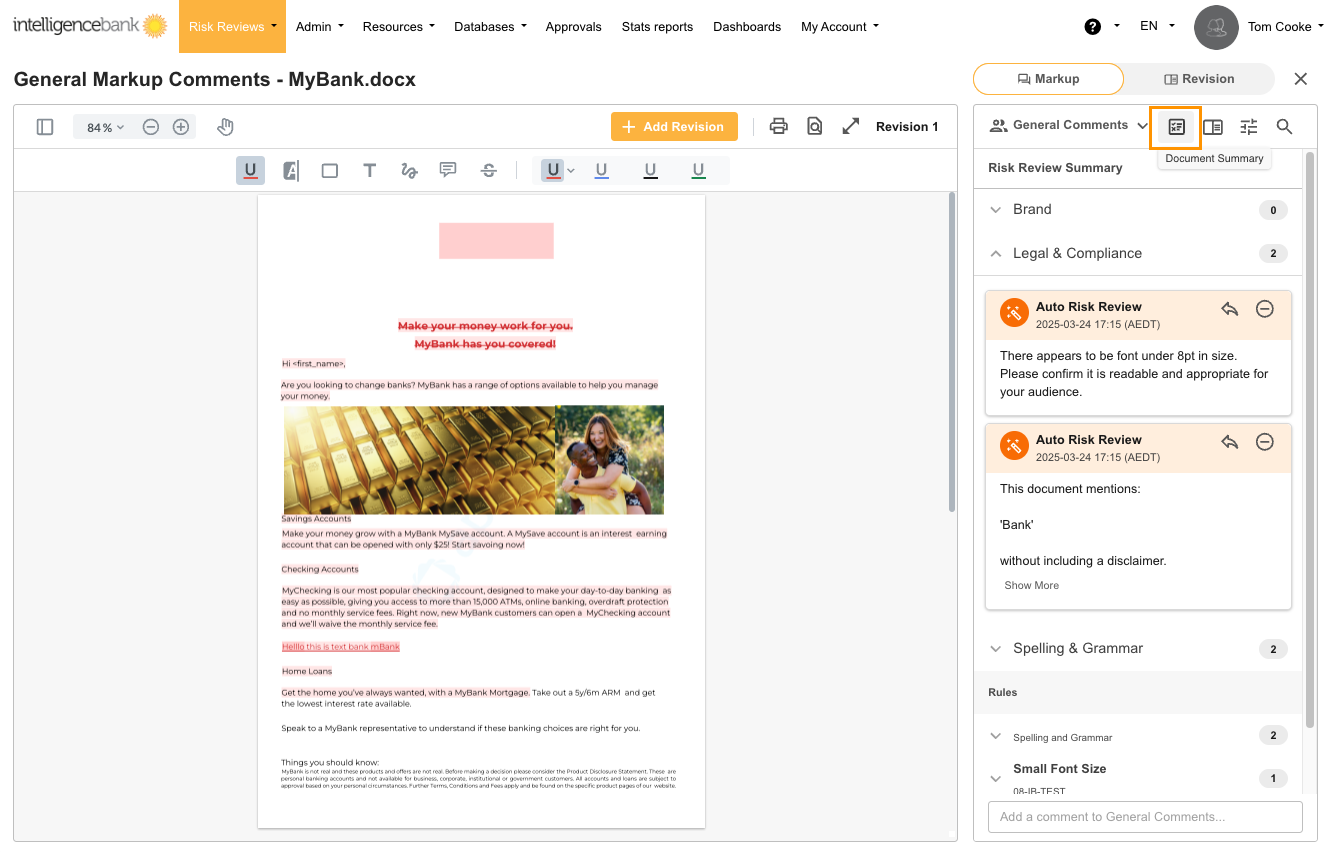
The document summary provides an overview of all identified risks found within your content. You may find this helpful while reviewing any detected risks, because it provides an effective way of breaking down or organizing the risks in a format that is easy to work through.
- Click the document summary icon at the top of the markup panel, indicated in the image below
- The summary panel shows:
- Risk counts by type (Legal & Compliance, Brand, Spelling & Grammar)
- Risks organized by rule
- Click on any risk comment in the summary to navigate directly to that issue in the content. The risky area/language will be outlined in a bounding box
Grouped Risks Feature
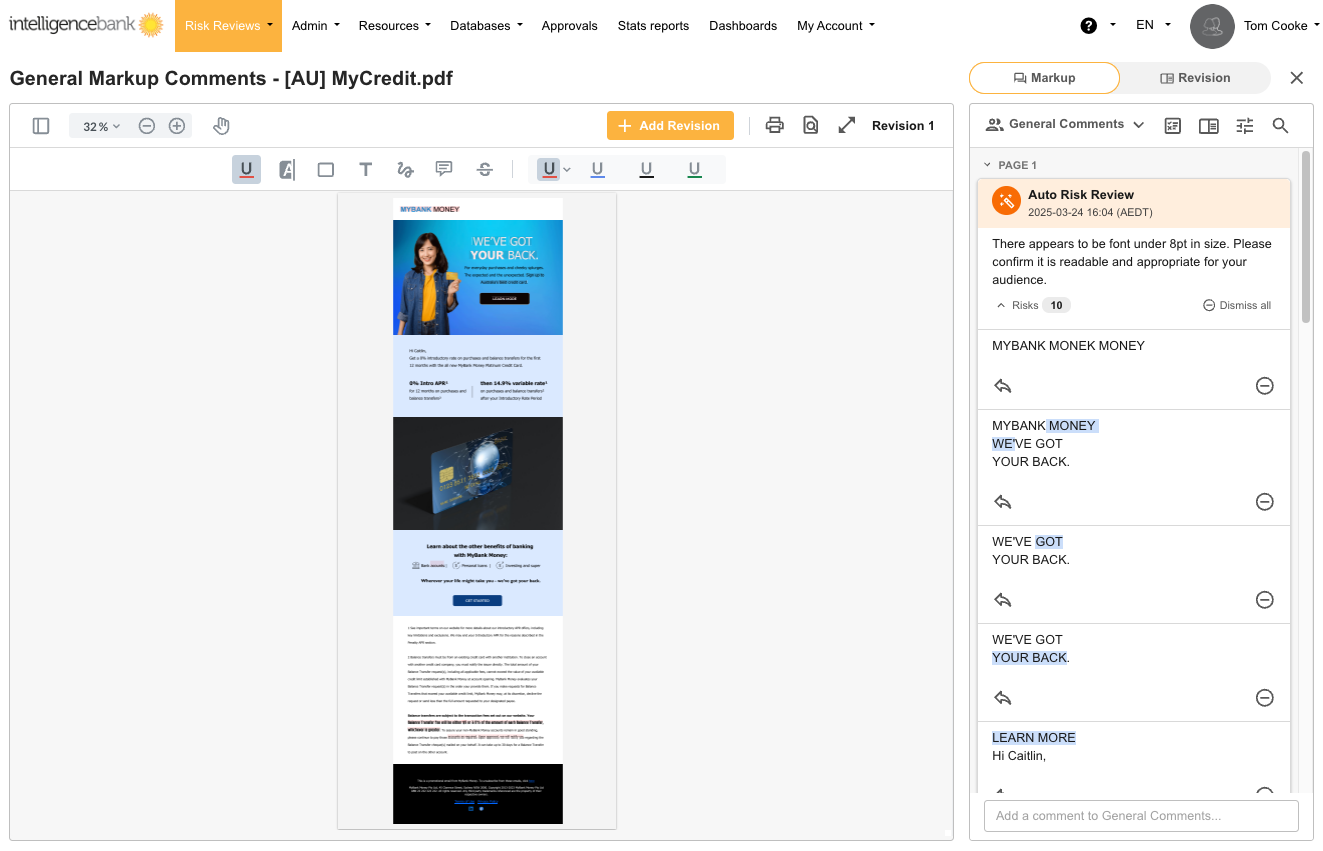
For some rules, risks may be grouped together. When this feature is enabled for a rule, instead of showing risks individually in the markup panel, all risks related to the same rule are grouped together in the markup panel.
By grouping together certain risks, you can deal with all risk types at once, increasing consistency and reducing the chance of error. Reviews with many risks will also be more digestible.
You will be able to choose which risks you'd like grouped together on a per-rule basis, and typically this gets decided during your implementation process.
Below are some key points to note about the grouped risks feature:
- Related risks are grouped in the markup panel
- Each risk shows the sentence where the issue was identified
- A highlight shows the specific term or phrase that triggered the rule
- Click on a risk in the group to see its context in the content
- You can reply to individual risks as well as click on Dismiss All to dismiss all risks in the group
Best Practice for Effective Risk Reviews
| 1Review Systematically | Work through risks by category or page for thoroughness |
| 2Understand Context | Always review the entire paragraph around a highlighted risk for context on why this risk was flagged |
| 3Reply if Dismissing | If dismissing risks, add comment replies to explain why certain risks were dismissed |
| 4Use a Consistent Approach | Apply the same standards across all content reviews |
| 5Use Document Summary | Navigate complex documents using the summary view |
| 6Prioritize Critical Issues | Address legal and compliance risks before stylistic concerns |
For specific questions about individual risks or rule interpretations, consult with your compliance team or administrator.
Was this article helpful?
That’s Great!
Thank you for your feedback
Sorry! We couldn't be helpful
Thank you for your feedback
Feedback sent
We appreciate your effort and will try to fix the article