Marketing Compliance Rules give your team clear, real-time visibility into the automated rules that govern your content reviews, so compliance is never a black box.
Table of Contents
Note: This feature is included with IntelligenceBank's Marketing Compliance package or the Content Risk Review add-on.
Why This Matters
Understanding which rules are applied to your content, and why, can be complex and time consuming. Marketing Compliance Rules removes that friction by bringing full rule visibility directly into your IntelligenceBank platform, in real time, where your team already works.
Key Capabilities
| Capability | What It Does |
|---|---|
| A unified view of all your rules | All compliance rules configured for your platform are displayed in a single, searchable table. This gives you a complete picture of your compliance rule set at a glance. |
| Search and filter | Quickly find the rules you need by searching by keyword across rule names and descriptions, or use filters to narrow results by Risk Type or any of your Risk Categories. |
| Rule details on demand | Click any rule to open a detailed view that includes the terms that trigger it, exception and proximity logic, required disclaimers, and the feedback shown to reviewers when the rule fires. |
| Self-service change requests | Submit rule change requests directly from the dashboard. The form auto-populates with the rule's ID, name, description, and risk type, and routes your request straight to the rules team. No support ticket is required. |
| General change requests | Use the Request General Changes button for bulk updates or requests that span multiple rules, such as adding a new rule or making a broader configuration change. |
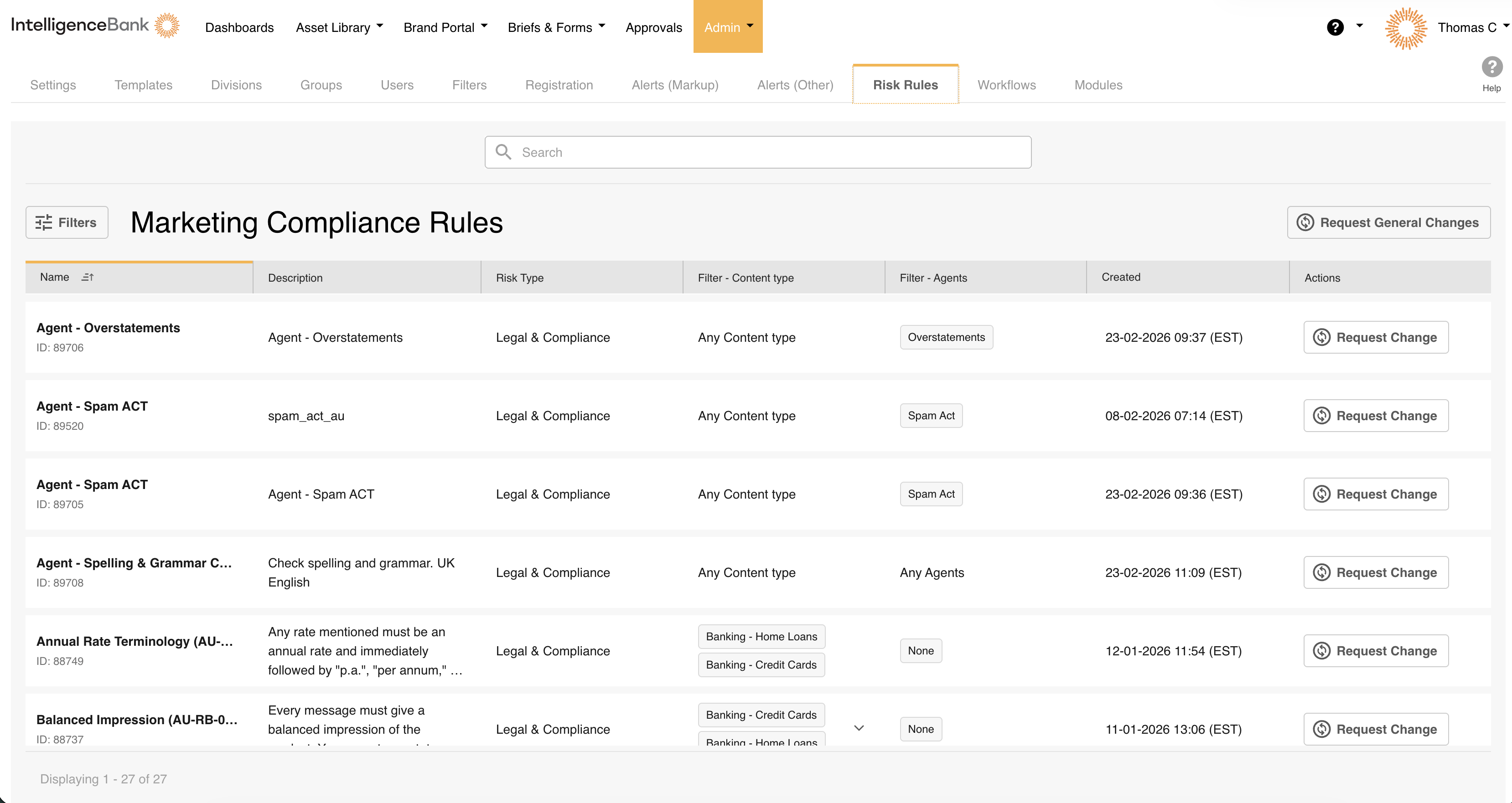
Who Can Use This Feature
| Who has access | Admin users only. |
| Where to find it | Admin > Risk Rules in your platform's main navigation. |
Can't see Risk Rules? This feature requires an existing Content Risk Review product to be enabled. If Risk Rules doesn't appear in your Admin area, contact your platform Admin or IntelligenceBank Support.
Need Help?
If you have questions about your rules or need a change made, email our team at support@intelligencebank.com.
Contact SupportWas this article helpful?
That’s Great!
Thank you for your feedback
Sorry! We couldn't be helpful
Thank you for your feedback
Feedback sent
We appreciate your effort and will try to fix the article