This article covers what the Content Risk Review Smart Report is, how to read it, and a breakdown of every widget it contains.
Table of Contents
What is the Content Risk Review Smart Report?
The Content Risk Review Smart Report gives compliance officers and business leaders a consolidated view of all content risk activity across their platform. Rather than reviewing individual submissions one by one, this report surfaces the patterns that matter: where risks are concentrated, which rules are triggering most frequently, how dismissal behavior is trending, and which users or content types are driving the most findings.
For organizations operating in highly regulated industries, this report is designed to support audit readiness, internal reporting, and ongoing compliance program management. It provides the evidence base you need to demonstrate that content is being reviewed, that risks are being acted on, and that your compliance posture is improving over time.
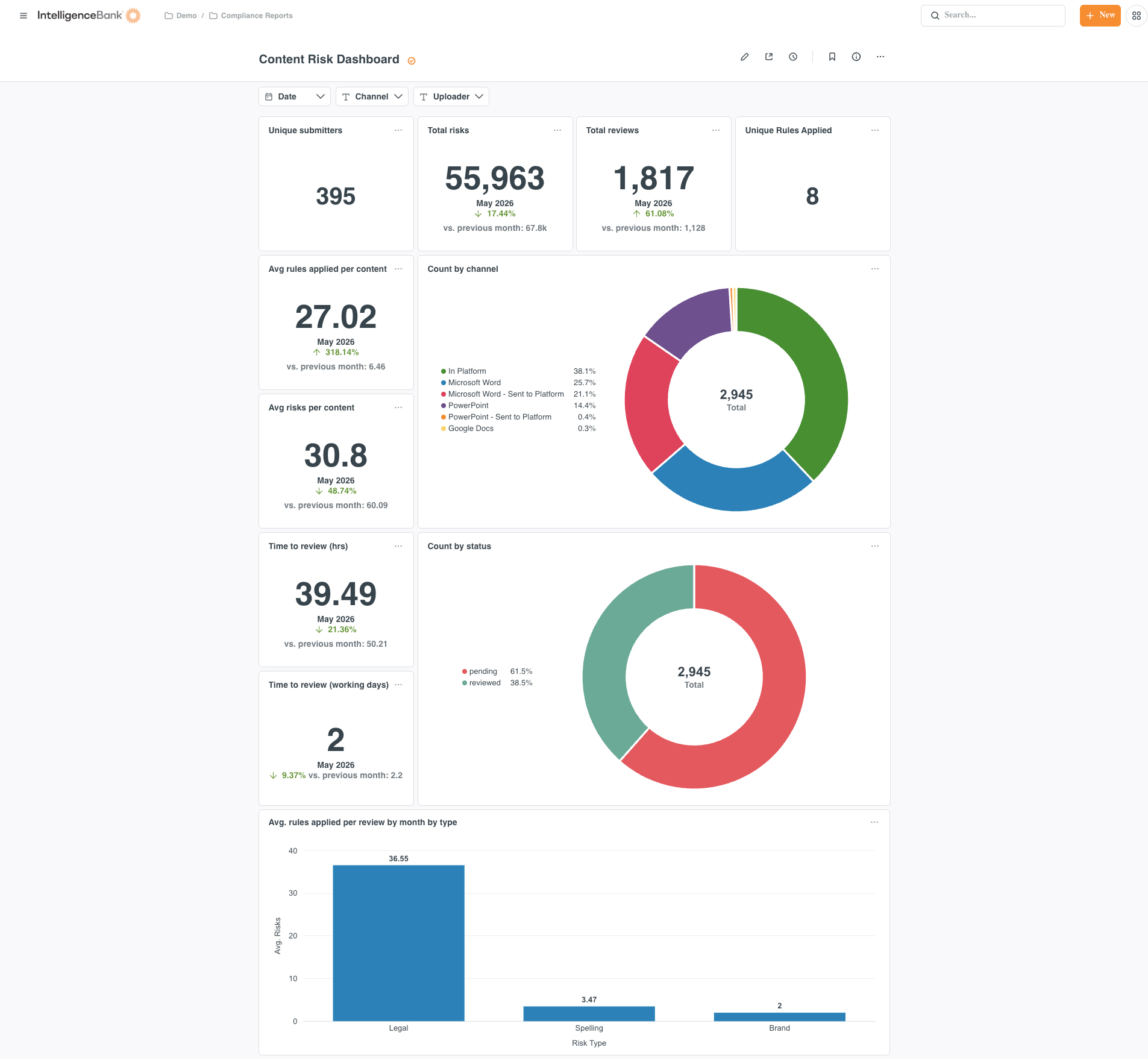
The report is organized into four sections, each designed to answer a different compliance question:
- Summary metrics give you the headline numbers for the selected period.
- Trend analysis shows how risk activity is changing over time.
- Risk breakdowns identify where risks are concentrated by type, rule, and status.
- Submitter and rule insights highlight the users and rules driving the most findings.
You can filter the report by date range to focus on a specific period, such as a financial quarter or audit window. Each widget updates based on the filters applied.
Summary metrics
These five widgets appear at the top of the report and give you an at-a-glance view of overall activity for the selected period.
| Widget | What it shows | How it's calculated |
|---|---|---|
| Total Reviews/Submissions | The total number of individual content risk reviews submitted across your platform. | Count of unique review submissions. |
| Total Risks Found | The total number of risks identified across all submissions in the selected period. | Count of all individual risk findings, including multiple risks within a single submission. |
| Total Files Reviewed | The number of unique files that have been reviewed. File revisions are not counted separately. | Count of distinct files reviewed, excluding duplicate revisions of the same file. |
| Total Dismissed | The number of risks that have been reviewed by a user and dismissed as not applicable. | Count of risk findings where the status has been set to Dismissed. |
| Dismissal Rate | The percentage of identified risks that were dismissed. A higher rate may indicate rules that need refinement, or a review population with lower-than-average compliance exposure. | Total dismissed risks divided by total risks found, expressed as a percentage. |
Trend analysis
These widgets show how risk activity is changing over time, allowing you to track the impact of policy changes, training initiatives, or shifts in submission volume.
| Widget | What it shows | How it's calculated |
|---|---|---|
| Total Submissions by Quarter | The number of content risk review submissions in each quarter. Useful for identifying seasonal patterns or the impact of policy changes over time. | Count of unique review submissions grouped by the quarter in which they were created. |
| Total Risks Found by Quarter | The number of risks identified in each quarter. Compare against submissions to understand whether risk density is changing. | Count of all risk findings grouped by the quarter in which the review was created. |
| Avg. Risks Found Per Review by Quarter | The average number of risks flagged per submission in each quarter. A rising average may signal increasing compliance exposure or expanding rule coverage. | Total risk findings divided by total submissions, calculated per quarter. |
| Risks Found Over Time | A timeline view of how many distinct risks have been identified. Use this to spot spikes, trends, and the effect of any rule or workflow changes. | Count of distinct risk findings plotted over time. |
Risk breakdowns
These widgets break down where risks are occurring, helping you understand the composition of your compliance exposure rather than just the total volume.
| Widget | What it shows | How it's calculated |
|---|---|---|
| Risks by Type | A breakdown of risks grouped by their risk type category. Shows which categories of risk are most prevalent across your content. | Count of risk findings grouped by risk type. |
| Risks by Rule Type | A breakdown of risks grouped by the specific rule that triggered them. Useful for identifying which rules are firing most frequently. | Count of risk findings grouped by rule type. |
| Dismissed vs. Active Risks | A comparison of risks that remain active against those that have been dismissed. Gives a clear picture of outstanding compliance exposure. | Count of risk findings grouped by their current status (Active or Dismissed). |
| Avg. Risks by Type | The average number of risks per submission broken down by risk type. Helps identify which risk categories tend to produce the most findings per review. | Average count of risk findings per submission, grouped by risk type. |
Submitter and rule insights
These widgets identify the specific users and rules generating the most risk findings. Use them to direct training, refine your rule set, or flag areas of the business that may need closer attention.
| Widget | What it shows | How it's calculated |
|---|---|---|
| Top Submitters by Risks Found | The ten users whose submissions have generated the most risk findings. Use this to identify where additional training or guidance may be needed. This data reflects activity from content submitted directly within IntelligenceBank. | Count of risk findings per user, ranked in descending order and limited to the top 10. Includes IntelligenceBank submissions only. |
| Top 10 by Rules | The ten rules that have been triggered most frequently across all submissions, shown alongside the number of reviews in which each rule appeared. Use this to understand which compliance rules are most commonly breached. | Count of risk findings and distinct reviews per rule, ranked by frequency and limited to the top 10. |
Things to keep in mind
- The Top Submitters widget only reflects content submitted directly within IntelligenceBank. Submissions made via connected third-party tools are not included in this widget.
- File revisions are not counted as separate files in the Total Files Reviewed metric. Each unique file is counted once, regardless of how many versions have been submitted.
- Dismissed risks remain visible in the report data. Dismissing a risk records that it was reviewed and found not to apply, which is itself an auditable action.
Please note that the terminology referenced above may appear differently in your platform as these are customizable terms. You can view alternative options here.
Was this article helpful?
That’s Great!
Thank you for your feedback
Sorry! We couldn't be helpful
Thank you for your feedback
Feedback sent
We appreciate your effort and will try to fix the article