Per-File Risk Filters lets a reviewer change the risk filters on a single file, within limits an administrator sets. A campaign pack stays one record with one approval trail, and each file is reviewed against the rules that fit it.
Table of Contents
What It Does
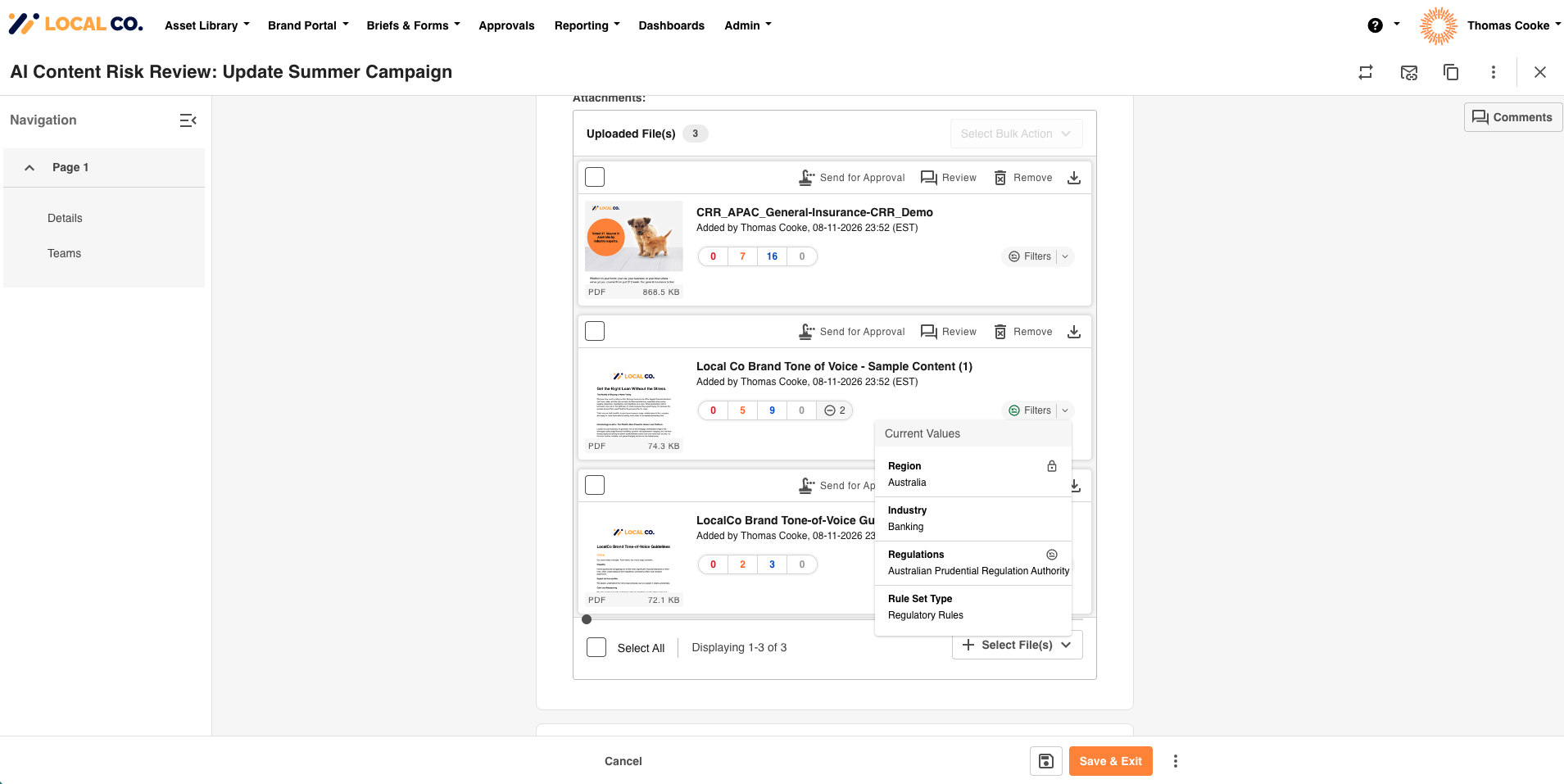
Risk filters (for example Region, Industry and Regulations) decide which rules a file is reviewed against within Content Risk Reviews. Until now they sat on the record, so every file in an upload field was reviewed against the same filters. With Per-File Risk Filters, each file card has a Filters button. It opens a popup where you can change the filter values for that one file.
- Files you do not change keep following the record's filters.
- Only the filters you change are stored for the file. Every other filter keeps following the record, including when the record is edited later.
- A file's changes are copied across to new revisions of that file.
- An administrator can lock filters so reviewers cannot change them.
Who Can Use It
- Reviewers and uploaders: anyone who can edit the record can change a file's filters, both when adding files and when editing the record.
- Administrators: turn it on for an upload field and choose which filters are locked.
It suits bundled content where the files in one record are not all for the same audience. For example, a campaign pack where one file is for one region or industry and another is for a different one.
Requirements
- The upload field has risk reviews enabled, with its risk filters chosen under Select Risk Review Filters. Only those filters can be changed per file.
- An admin has ticked Enable Per-File Risk Filters on the upload field. It is off by default.
- If you cannot find the setting described in Getting Started with Per-File Risk Filters, contact your Customer Success Manager or IntelligenceBank Support.
- It is not available for upload fields inside a repeatable section.
How It Fits with Your Existing Setup
- Record-level filters are unchanged. Per-file changes sit on top of them.
- Every file is still risk reviewed. A change only alters the filter values used to select the rules for that file.
- The record keeps one approval trail, however many files carry their own filters.
- Changes are made one file at a time. Per-File Risk Filters does not split one large document into sections.
Next: Getting Started with Per-File Risk Filters for setup and the steps to change a file's filters, and Per-File Risk Filters: FAQs and Limits for limits and common questions.
For the wider setup, see Setting Up a Database for Content Risk Reviews.
Need Help?
For questions about Per-File Risk Filters, contact your Main Admin or IntelligenceBank Support.
Contact SupportWas this article helpful?
That’s Great!
Thank you for your feedback
Sorry! We couldn't be helpful
Thank you for your feedback
Feedback sent
We appreciate your effort and will try to fix the article