When a resource or asset is uploaded into IntelligenceBank, it is automatically indexed for search. Users can type in search terms and retrieve matches by default on the Title, Description, Keywords, Content, Unique ID, Text Based Custom Upload Fields, and Embedded Metadata* of resources/assets.
IntelligenceBank search is not case sensitive, but is weighted by relevance. To learn more about how search is weighted, please refer to this article.
Table of Contents
How Search Works
IntelligenceBank search is designed to return the most relevant results based on what users type in as their search term(s).
Search is enhanced in the following ways:
Multi-keyword matching/precision search: When you search with multiple words/terms, search requires a minimum percentage of keywords to match and ranks results as more relevant when those keywords appear together as phrases. For example, searching for "red leather jacket" will return results that contain all three of those terms listed first in your search results. This ensures that the most relevant assets appear first. For two-keyword searches, both words must match. For three or more keywords, at least 70% must match (for example, 2 out of 3 words, or 3 out of 5 words). Results showing matching keywords together as phrases are ranked highest.
Automatic word variations: Search automatically recognizes word variations including plurals, verb tenses, and word endings. For example, searching for "running shoes" will also find "runner shoes," "run shoes," and "running shoe" without needing to type each variation. This helps create efficiency for users who are searching for assets, preventing them from having to search for the exact word variation in order to find relevant assets.
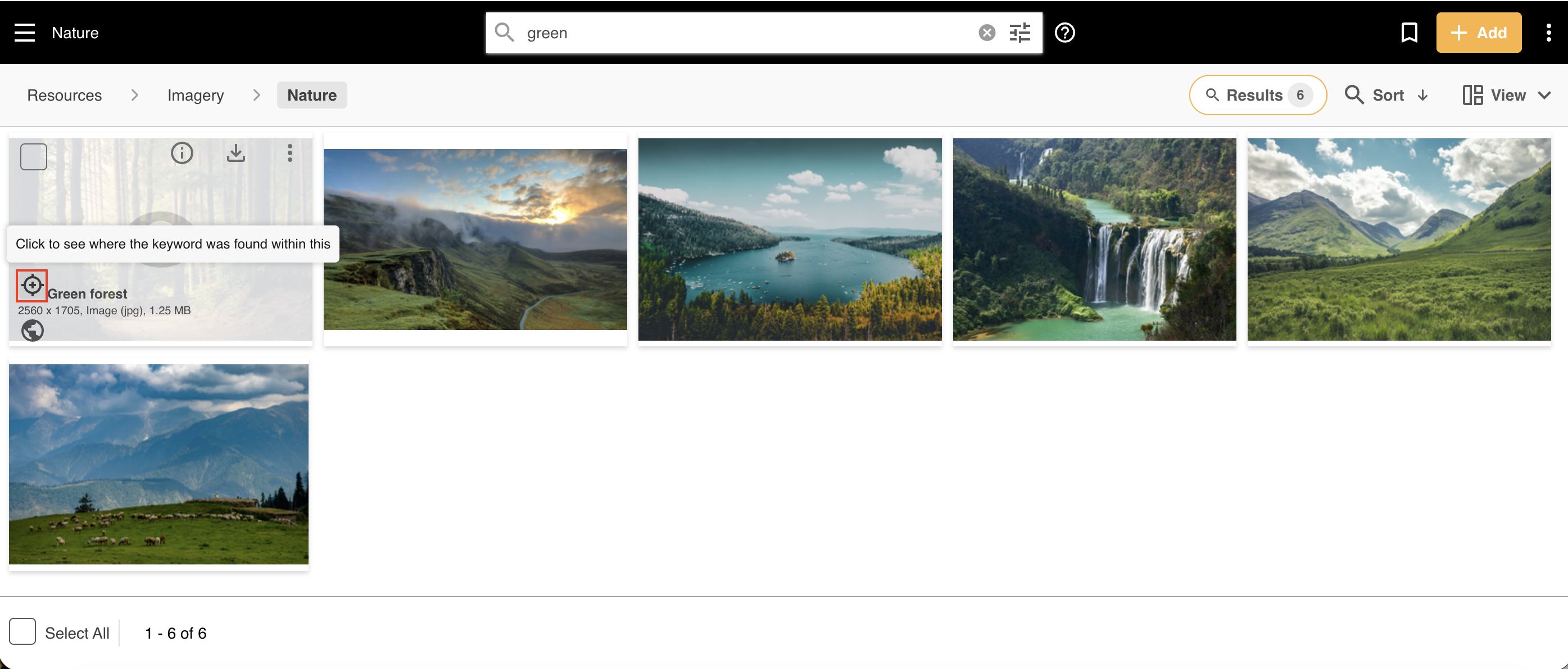
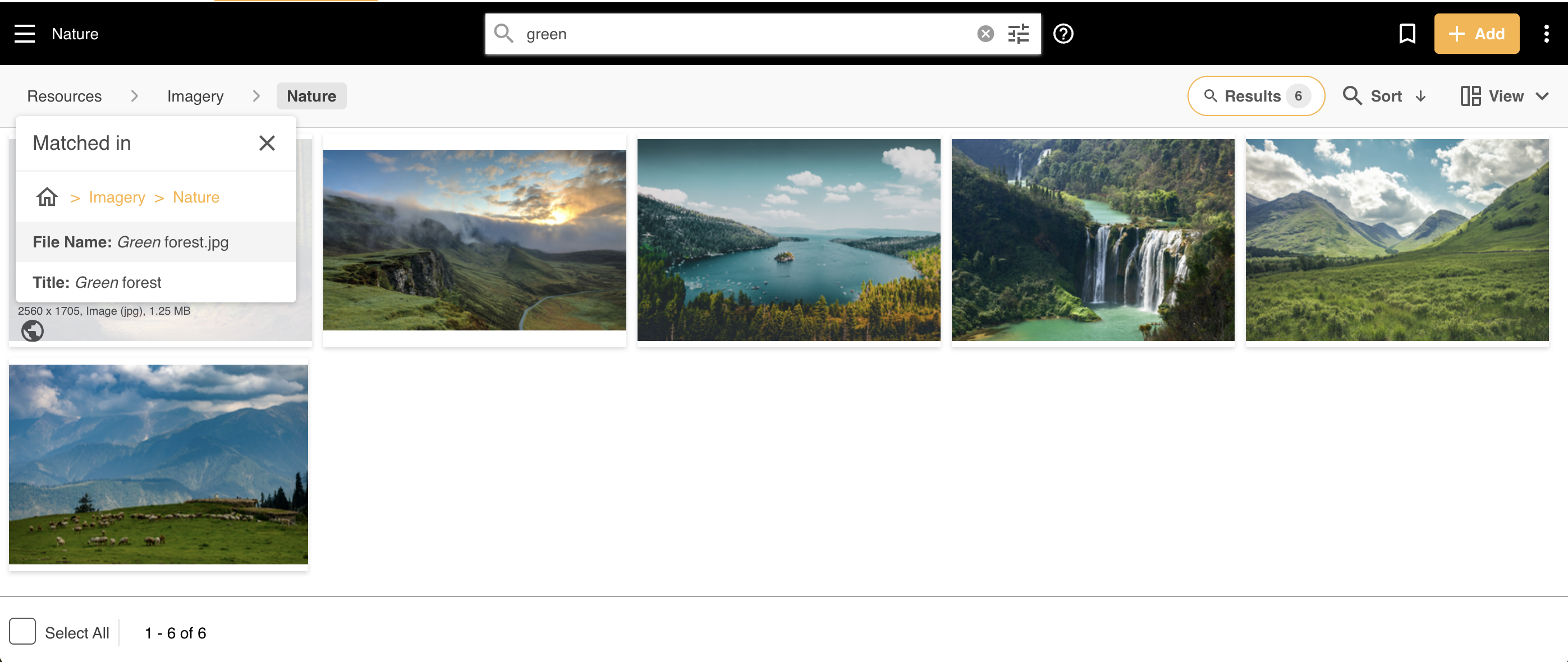
Search results are ranked by match relevance. You can quickly see where in the title, description, filters, content or metadata the search term has matched the asset by selecting the icon illustrated below.
Key Points to Keep in Mind While Searching
Searching within a folder will return results in that folder and any subfolders "downstream" of it. Searching across all folders (i.e. a global search) can be done in the main parent folders view or off a welcome page search bar (if set up).
Doing a search in the main search bar of the Asset Library will only return assets, not folders. Searching for folders in IntelligenceBank is in a separate area on the platform. To learn more about how to do a folder search, please read this article.
Asset searching takes into account a user's permissions and will only return results the user has permission/access to see, ensuring governance is maintained. This means different users might get different search results depending on their group permissions.
Search Fields
Select Fields and Filters can also be matched with a free text query, but need to be surrounded by "" if the field/filter value has multiple words. Only results where all the words are inputted will be matched.
Note that Select Fields and Filter matches can only be identified via free text search when using the platform, not the API.
Date fields are also searchable via the date based filtering conditions in the search side panel.
Learn more about custom upload fields and metadata mapping.
Boolean Operators
Boolean operators AND, OR and NOT can improve your search results by combining or limiting terms. Boolean logic is a system of showing relationships between sets by using the words "AND," "OR," and "NOT."
| Operator | Search Term | IntelligenceBank Notes |
|---|---|---|
| None | ying yang | ying yang: both words must match. Results where they appear together as a phrase are ranked higher. |
| None (3+ keywords) | ying yang zen | ying yang zen: at least 2 out of 3 words must match (70% minimum). Results where matching words appear together as phrases are ranked higher. |
| Quotations | "ying yang" | "ying yang": any documents that contain the phrase "ying yang". The result is a phrase match, not an exact match. |
| And | ying AND yang | ying AND yang: any documents that must contain both the words ying and yang. |
| And (no space) | ying ANDyang | ying ANDyang: any documents that contain the word ying OR the word ANDyang. |
| And (combination) | ying AND "yang" | ying AND "yang": any documents that must contain both the words ying and yang. |
| And (no spaces) | yingANDyang | yingANDyang: any documents that contain the word yingANDyang. |
| Or | ying OR yang | ying OR yang: any documents that contain the word yang or the word ying (at least one must match). |
| Not | ying NOT yang | ying NOT yang: any documents that contain the word ying but not the word yang. |
Wildcard Searching
You can use wildcards (*) on either end of a search word to return partial word results:
*manwill match "woman"man*will match "mannequin"*man*will match any word which includes the characters "man", so either "woman" or "mannequin"
Underscore/Hyphen Character Handling
When searching, underscores (_) and hyphens (-) in the filename are treated as spaces if they match characters in the title. Therefore, when conducting a search, underscores and hyphens are automatically excluded from consideration and should not be included in the search. Including them might inadvertently exclude relevant results.
Document Content Extraction
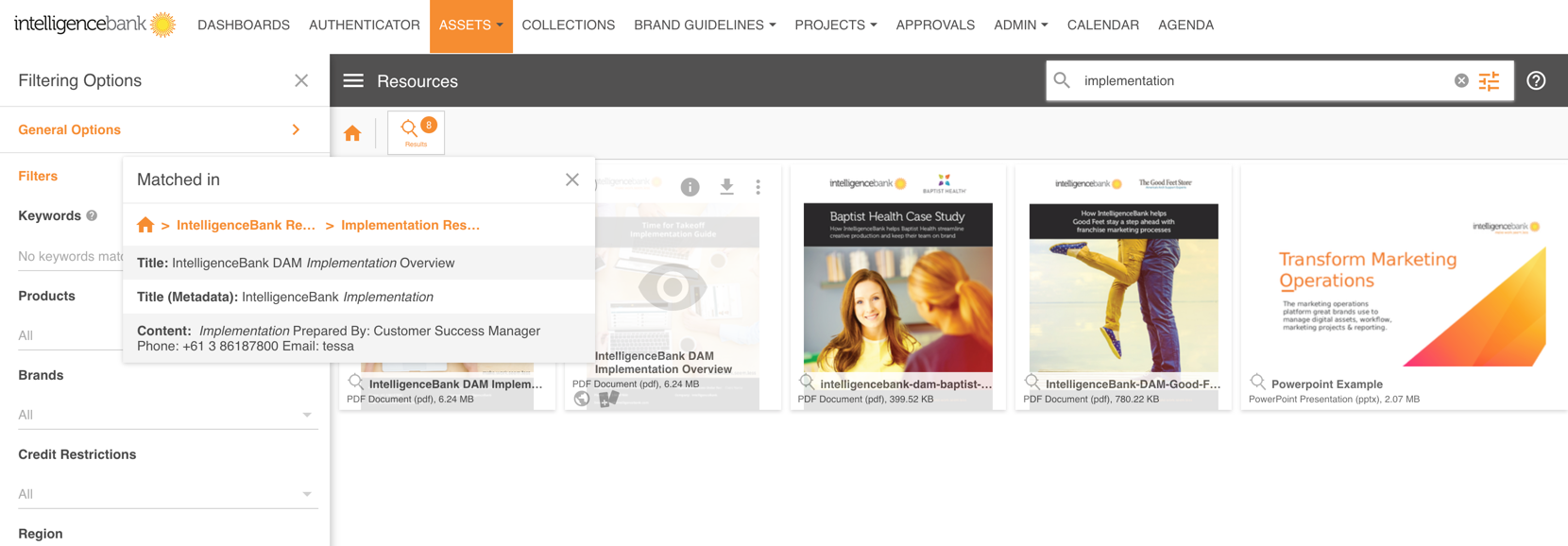
When uploading document files, content is automatically extracted and indexed for formats like PDF, text files, XML, HTML, and the most popular document files (Excel, Powerpoint, Word, Keynote...).
That means that searches will retrieve matches directly from this content, in addition to the other standard fields (i.e. title, description, keywords, etc) that are indexed for search.
Below are the supported document formats that support content extraction/search:
"xhtml", "ooxml", "odf", "pub", "xps", "pst", "doc", "dot", "wbk", "docx", "docm", "dotx", "dotm", "docb", "xls", "xlt", "xlm", "xlsx", "xlsm", "xltx", "xltm", "xlsb", "xla", "xlam", "xll", "xlw", "ppt", "pot", "pps", "pptx", "pptm", "potx", "potm", "ppam", "ppsx", "ppsm", "sldx", "sldm", "odt", "fodt", "ods", "fods", "odp", "fodp", "odg", "fodg", "odf", "pages", "numbers", "key", "pdf", "epub", "rtf", "txt", "eml", "msg", "email"
*Embedded Metadata
The following embedded metadata tags are automatically indexed for search if found during general upload extraction:
"ib_meta_file_comment" => 'Comment',
"ib_meta_file_filetype" => 'File Type',
"ib_meta_file_mimetype" => 'Mime Type',
"ib_meta_file_imagewidth" => 'Image Width',
"ib_meta_file_imageheight" => 'Image Height',
"ib_meta_system_filecreatedate" => 'Creation Date',
"ib_meta_jpeg_comment" => 'Comment - JPEG',
"ib_meta_composite_imagesize" => 'Image Size',
"ib_meta_ifd0_make" => 'Hardware Make',
"ib_meta_ifd0_model" => 'Hardware Model',
"ib_meta_ifd0_artist" => 'Artist',
"ib_meta_ifd0_copyright" => 'Copyright',
"ib_meta_ifd0_software" => 'Software Used',
"ib_meta_ifd0_xresolution" => 'X Resolution',
"ib_meta_ifd0_yresolution" => 'Y Resolution',
"ib_meta_ifd0_resolutionunit" => 'Resolution Unit',
"ib_meta_ifd0_orientation" => 'Orientation',
"ib_meta_ifd0_compression" => 'CompressionType',
"ib_meta_ifd0_modifydate" => 'Last Modified - File',
"ib_meta_ifd0_imagedescription" => 'Image Description',
"ib_meta_exififd_colorspace" => 'Color Space',
"ib_meta_exififd_usercomment" => 'User Comments',
"ib_meta_exififd_datetimeoriginal" => 'Date and Time Original',
"ib_meta_xmp_exif_colorspace" => 'Color Space - Exif',
"ib_meta_xmp_exif_usercomment" => 'User Comment - Exif',
"ib_meta_xmp_exif_datetimeoriginal" => 'Date and Time Original - Exif',
"ib_meta_iptc_objectname" => 'Object Name - IPTC',
"ib_meta_iptc_category" => 'Category - IPTC',
"ib_meta_iptc_keywords" => 'Keywords - IPTC',
"ib_meta_iptc_captionabstract" => 'Caption - IPTC',
"ib_meta_iptc_localcaption" => 'Local Caption - IPTC',
"ib_meta_iptc_copyrightnotice" => 'Copyright Notice - IPTC',
"ib_meta_iptc_credit" => 'Credit - IPTC',
"ib_meta_iptc_source" => 'Source - IPTC',
"ib_meta_iptc_contact" => 'Contact - IPTC',
"ib_meta_iptc_documentnotes" => 'Document Notes - IPTC',
"ib_meta_iptc_digitalcreationdate" => 'Creation Date - IPTC',
"ib_meta_iptc_imageorientation" => 'Image Orientation - IPTC',
"ib_meta_iptc_interchangecolorspace" => 'Color Space - IPTC',
"ib_meta_iptc_byline" => 'By Line - IPTC',
"ib_meta_iptc_bylinetitle" => 'By Line Title - IPTC',
"ib_meta_xmp_iptccore_scene" => 'Scene - IPTC Core',
"ib_meta_xmp_iptccore_subjectcode" => 'Subject Code - IPTC Core',
"ib_meta_xmp_iptccore_creatorcontactinfo" => 'Creator Contact - IPTC Core',
"ib_meta_xmp_iptccore_creatoraddress" => 'Creator Address - IPTC Core',
"ib_meta_xmp_iptccore_creatorregion" => 'Creator Region - IPTC Core',
"ib_meta_xmp_iptccore_creatorpostalcode" => 'Creator Postal Code - IPTC Core',
"ib_meta_xmp_iptccore_creatorcountry" => 'Creator Country - IPTC Core',
"ib_meta_xmp_iptccore_countrycode" => 'Country Code',
"ib_meta_xmp_iptccore_creatorworkurl" => 'Creator Work Url - IPTC Core',
"ib_meta_xmp_iptccore_creatorworkemail" => 'Creator Work Email - IPTC Core',
"ib_meta_xmp_iptcext_artworktitle" => 'Artwork Title - IPTC Ext.',
"ib_meta_xmp_iptcext_artworkcreator" => 'Artwork Creator - IPTC Ext.',
"ib_meta_xmp_iptcext_artworksource" => 'Artwork Source - IPTC Ext.',
"ib_meta_xmp_iptcext_artworkcopyrightnotice" => 'Artwork Copyright Notice - IPTC Ext.',
"ib_meta_xmp_iptcext_personinimage" => 'Person In Image - IPTC Ext',
"ib_meta_xmp_dc_title" => 'Title - DC',
"ib_meta_xmp_dc_description" => 'Description - DC',
"ib_meta_xmp_dc_format" => 'Content Type - DC',
"ib_meta_xmp_dc_language" => 'Language - DC',
"ib_meta_xmp_dc_rights" => 'Copyright - DC',
"ib_meta_xmp_dc_subject" => 'Subject - DC',
"ib_meta_xmp_dc_creator" => 'Creator - DC',
"ib_meta_xmp_xmp_title" => 'Title - XMP',
"ib_meta_xmp_xmp_author" => 'Author - XMP',
"ib_meta_xmp_xmp_creatortool" => 'Software Used - XMP',
"ib_meta_xmp_tiff_make" => 'Make - TIFF',
"ib_meta_xmp_tiff_model" => 'Model - TIFF',
"ib_meta_xmp_tiff_orientation" => 'Orientation',
"ib_meta_xmp_tiff_compression" => 'Compression - TIFF',
"ib_meta_xmp_tiff_imagedescription" => 'Image Description - TIFF',
"ib_meta_xmp_tiff_imageheight" => 'Image Height - TIFF',
"ib_meta_xmp_tiff_imagewidth" => 'Image Width - TIFF',
"ib_meta_xmp_tiff_xresolution" => 'X Resolution - TIFF',
"ib_meta_xmp_tiff_yresolution" => 'Y Resolution - TIFF',
"ib_meta_xmp_tiff_resolutionunit" => 'Resolution Unit - TIFF',
"ib_meta_xmp_tiff_copyright" => 'Copyright - TIFF',
"ib_meta_xmp_tiff_software" => 'Software - TIFF',
"ib_meta_png_imagewidth" => 'Image Width - PNG',
"ib_meta_png_imageheight" => 'Image Height - PNG',
"ib_meta_png_make" => 'Hardware Make - PNG',
"ib_meta_png_model" => 'Hardware Model - PNG',
"ib_meta_png_title" => 'Title - PNG',
"ib_meta_png_author" => 'Author - PNG',
"ib_meta_png_artist" => 'Artist - PNG',
"ib_meta_png_comment" => 'Comment - PNG',
"ib_meta_png_copyright" => 'Copyright - PNG',
"ib_meta_png_description" => 'Description - PNG',
"ib_meta_png_filter" => 'Filter - PNG',
"ib_meta_png_colourtype" => 'Colour Type - PNG',
"ib_meta_png_compression" => 'Compression - PNG',
"ib_meta_png_software" => 'Software Used - PNG',
"ib_meta_png_profilename" => 'Profile Name - PNG',
"ib_meta_gif_gifversion" => 'GIF Version - GIF',
"ib_meta_gif_imagewidth" => 'Image Width - GIF',
"ib_meta_gif_imageheight" => 'Image Height - GIF',
"ib_meta_gif_comment" => 'Comment - GIF',
"ib_meta_pdf_title" => 'Title',
"ib_meta_pdf_author" => 'Author',
"ib_meta_pdf_copyright" => 'Copyright',
"ib_meta_pdf_creationdate" => 'Create Date',
"ib_meta_pdf_modifydate" => 'Modify Date',
"ib_meta_pdf_language" => 'Document Language',
"ib_meta_pdf_creator" => 'Creator',
"ib_meta_pdf_keywords" => 'Keywords',
"ib_meta_pdf_producer" => 'Software Used',
"ib_meta_pdf_pagelayout" => 'Page Layout',
"ib_meta_xmp_pdf_author" => 'Author - XMP',
"ib_meta_xmp_pdf_copyright" => 'Copyright - XMP',
"ib_meta_xmp_pdf_creationdate" => 'Create Date - XMP',
"ib_meta_xmp_pdf_mod_date" => 'Modify Date - XMP',
"ib_meta_xmp_pdf_creator" => 'Creator - XMP',
"ib_meta_xmp_pdf_keywords" => 'Keywords - XMP',
"ib_meta_xmp_pdf_producer" => 'Software Used - XMP',
"ib_meta_gps_gpslatitude" => 'GPS Latitude',
"ib_meta_gps_gpslongitude" => 'GPS Longitude',
"ib_meta_gps_gpsaltitude" => 'GPS Altitude',
"ib_meta_gps_gpsversionid" => 'GPS VersionID',
"ib_meta_xmp_exif_gpslatitude" => 'GPS Latitude - Exif',
"ib_meta_xmp_exif_gpslongitude" => 'GPS Longitude - Exif',
"ib_meta_xmp_exif_gpsaltitude" => 'GPS Altitude - Exif',
"ib_meta_xmp_exif_gpsversionid" => 'GPS VersionID - Exif',
"ib_meta_composite_gpslatitude" => 'GPS Latitude - Composite',
"ib_meta_composite_gpslongitude" => 'GPS Longitude - Composite',
"ib_meta_composite_gpsaltitude" => 'GPS Altitude - Composite',
"ib_meta_composite_gpsposition" => 'GPS VersionID - Composite',
"ib_meta_composite_gpsversionid" => 'GPS VersionID - Composite'
Was this article helpful?
That’s Great!
Thank you for your feedback
Sorry! We couldn't be helpful
Thank you for your feedback
Feedback sent
We appreciate your effort and will try to fix the article