To help maintain brand consistency and compliance, Main Admins can determine what specific Users or Groups can do when it comes to using Ad-Hoc transformations, and/or Transformation Pre-sets on Assets.
Configure Transformation Permissions
Within each user group's permission settings, there are two sub-resource/asset modules which control that group's (or User-as-Group's) transformation permissions:
- Ad-Hoc Transformations
- Transformations Preset
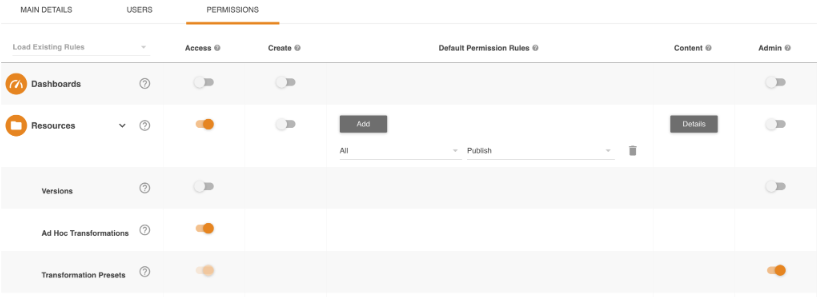
Ad-Hoc Transformation Configuration
Ad-hoc has one permission option:
- Access: This allows users to apply Ad Hoc Transformations on assets they have Access permission or higher on, when options are available.
Transformation Presets Configuration
Transformations Presets have two permission options:
- Access: This allows users to use Transformation Presets
- Admin: This allows users to create, use, and manage all Transformation Presets. (e.g. they'll be able to both use Transformation Presets as well as Add/Edit Presets)
End User Transformation Scenarios
Depending on the above settings, users will then find the below behaviour available to them:
| Ad-Hoc Permissions Level | Transformation Preset Permissions | Outcome |
|---|---|---|
| None | None |
|
| None | Access |
|
| None | Admin |
|
| Access | Access |
|
| Access | Admin |
|
Transformation Areas & Supported Asset Types
Transformation Permissions impact the below areas and are applicable for the mentioned asset types:
-
Ad-Hoc Transformation:
- Single Download: Videos, Images, Documents
- Bulk Download: Images
- Share / Embed: Images
-
Transformation Presets:
- Single Download: Images
- Bulk Download: Images
- Share / Embed: Images
This is dependent on other relevant download and share settings being enabled. Click into the 'Related' articles below for more detail on each of those associated features.
Please note that the 'Assets' terminology referenced above may appear differently in your platform as these are customisable terms. You can view alternative options here.
Related:
Was this article helpful?
That’s Great!
Thank you for your feedback
Sorry! We couldn't be helpful
Thank you for your feedback
Feedback sent
We appreciate your effort and will try to fix the article