Dismissal Reasons lets reviewers say why they dismissed a risk that was flagged automatically in a Content Risk Review, so the decision is recorded and can be understood later.
Table of Contents
What Dismissal Reasons Does
Until now, dismissing a risk only recorded that someone clicked Dismiss. With Dismissal Reasons, the reviewer also records why. That gives your team a clear record of how flagged risks were handled, and a basis for discussing rule quality with your Customer Success team.
- Quick dismiss: one click dismisses a risk with the default reason.
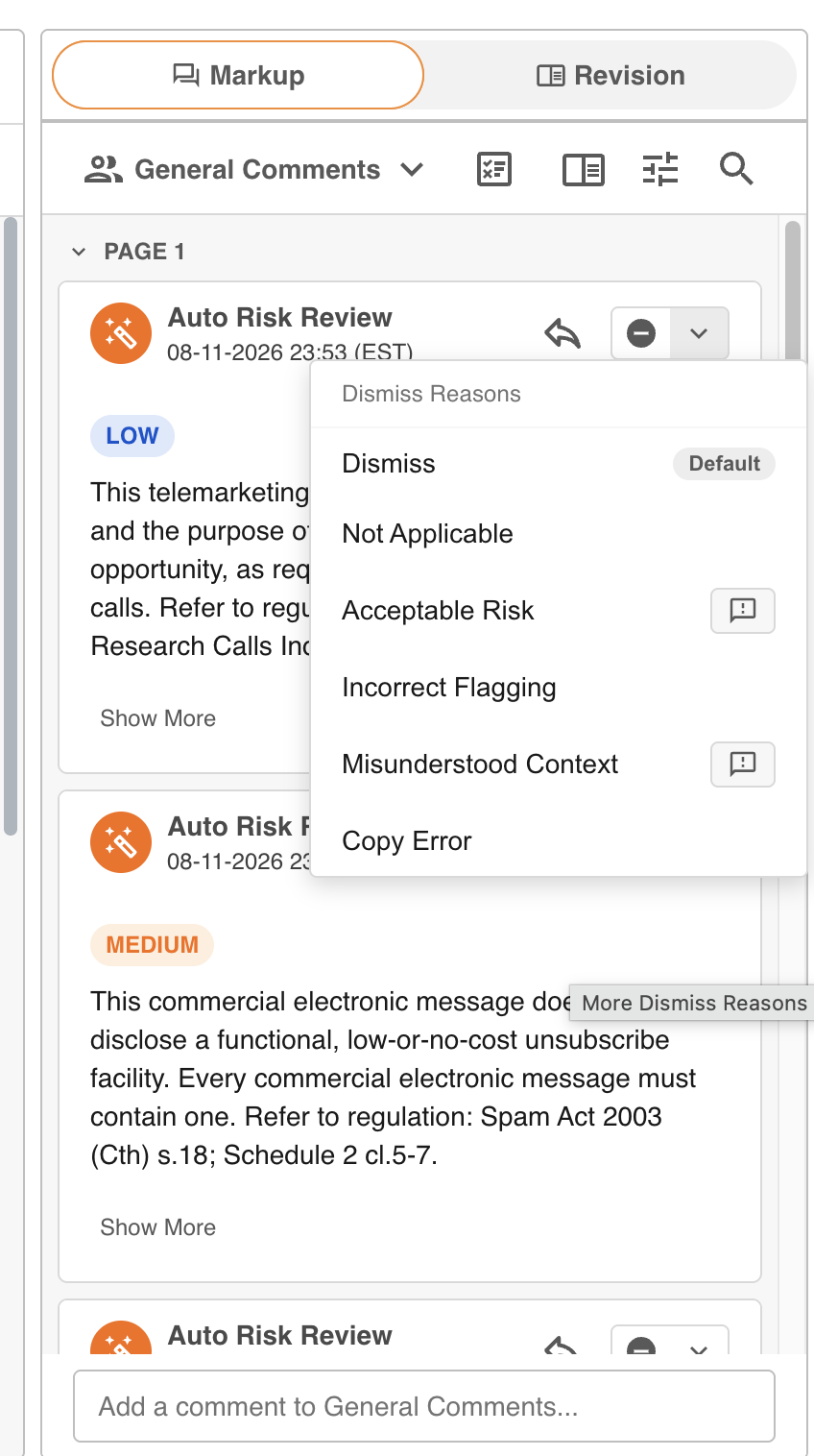
- Choose a reason: open the list next to the Dismiss button and pick the reason that fits.
- Add a comment: some reasons ask for a short comment, up to 255 characters. The comment is saved as a reply under the risk.
- See who and why: a dismissed risk shows its reason and who dismissed it.
- Dismiss a group: one reason applies to every risk in the group.
Dismissal Reasons applies to risks flagged automatically. Comments added by people keep their usual Resolve and Unresolve options. Reviews remain a compliance aid for a person to assess, not an automated verdict.
The Six Reasons
IntelligenceBank provides a fixed set of six reasons. They cannot be renamed or added to. Your administrator chooses which of them are available, and which of them ask for a comment, for each upload field. By default, Acceptable Risk asks for a comment, and your administrator can change this.
| Dismiss | Not Applicable |
| Acceptable Risk | Incorrect Flagging |
| Misunderstood Context | Copy Error |
Where It Works
Dismissal Reasons is available when you review files in the IntelligenceBank Platform. It is not available in the Red Marker app, the Office and Google add-ins, or the browser extension.
To set it up and start using it, see Getting Started with Dismissal Reasons. For limits and common questions, see Dismissal Reasons: FAQs and Limits. For the wider review workflow, see Working with Identified Risks.
Need Help?
If you cannot see Dismissal Reasons or a reason is missing from the list, contact IntelligenceBank Support.
Contact SupportWas this article helpful?
That’s Great!
Thank you for your feedback
Sorry! We couldn't be helpful
Thank you for your feedback
Feedback sent
We appreciate your effort and will try to fix the article