IntelligenceBank's Markup Comments feature allows you to annotate, comment on, and collaborate with other users on assets that are pending approval.
Markup Comments are accessible in the Approvals List area of the platform and provide enhanced proofing capabilities, allowing users involved in an approval request to provide informal, yet trackable feedback on an asset.
Users can also add Revisions or Versions of assets pending approval, offering a more iterative way of progressing your work-in-progress or draft assets, from submission through to approval.
For more information on Revisions/Versions, please reference the article here.
For a detailed overview of Markup Comments and Annotations, please reference the article here.
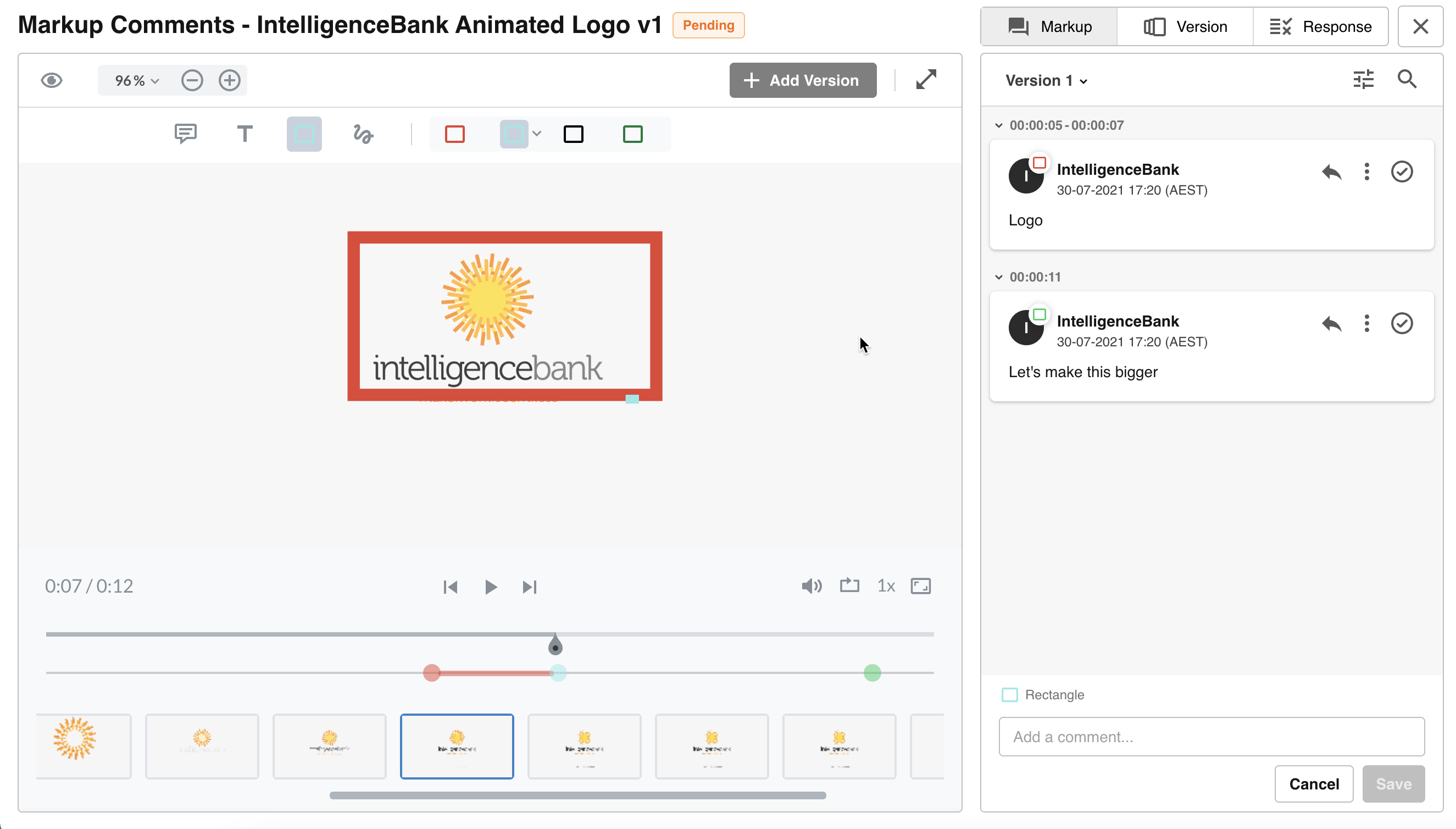
Table of Contents
Key Benefits
During the creation or review phases of an asset, there are often instances where you need to provide feedback and request changes prior to approval. This feedback can often occur during face-to-face sessions or via email, which can be difficult to track or become disorganized.
Markup Comments are designed to bring a lot of that collaboration directly within IntelligenceBank. Within the Markup Comments tab, users involved in the approval request can add annotations and comments and have a discussion on the changes that need to be made before reviewers approve (i.e. while the approval request is still pending). This allows for a more iterative approach to approving assets, reflecting a more natural way assets generally get reviewed.
Users can also add new Versions / Revisions, allowing them to make the requested changes offline before uploading the newest version for everyone to re-review, as many times as it takes to get the asset ready for official approval.
These feedback loops and updates to the asset all occur within the same approval request and do not require reviewers to submit their approval until all of their changes have been resolved.
The comments and annotations added on all Versions / Revisions during the request are available even after the asset is approved. This means that the full working history of the file is available for review at any time by those involved (or certain Admins).
Where are Markup Comments available?
Markup Comments are available for the following approval options:
- Resource/Asset Publish Approvals
- Resource/Asset Feedback Approvals
- Record File Approvals
- General Markup Comments feature on assets uploaded to Multi-Upload fields on records
What File Formats are supported for Markup Comments?
Markup Comments are available for the following file formats:
- Any Image, Document and Video formats that are supported for Preview Generation.
- The following Audio formats: mp3, wav, flac, ogg.
- A URL that can be displayed in an iFrame - must be publicly accessible and secure.
General Comments can still be added for any other file format, however without annotations or preview display support.
Notable Markup Comments Restrictions
There are some additional restrictions and scenarios to note for users accessing the Markup Comments page:
- When the approval request is pending, participants that can access the Review Request overlay but don't have permission to the underlying asset can see the Markup Comments button, but all editable actions on the Markup Comments page are disabled.
- The Markup Comments overlay will be available if the request is in any status (excluding Cancelled if the asset is deleted). This allows users to access all Markup Comments within the request during all phases of an approval, and also once it's completed. Users will only be allowed to interact with and update the Markup Comments if the request is in a pending state.
- Markup Comments cannot be accessed by users on the IE11 browser.
- Markup Comments are currently not reportable
- Markup Comments functionality is unrelated to Resource Annotations options or any other legacy Annotation functionality available in the platform.
- The Live HTML Markup ability is currently only supported for Resource Publish Approvals.
Was this article helpful?
That’s Great!
Thank you for your feedback
Sorry! We couldn't be helpful
Thank you for your feedback
Feedback sent
We appreciate your effort and will try to fix the article