It is easy to view the approval history of your briefs/forms, which you may find helpful if you ever need to refer back to the reviewer who approved, date approval was provided, and/or any relevant approval comments.
To view the approval history for any brief/form that you either requested approval on, or were the reviewer for:
- Navigate to the brief/form database and locate/search for the brief you need to see the approval history on.
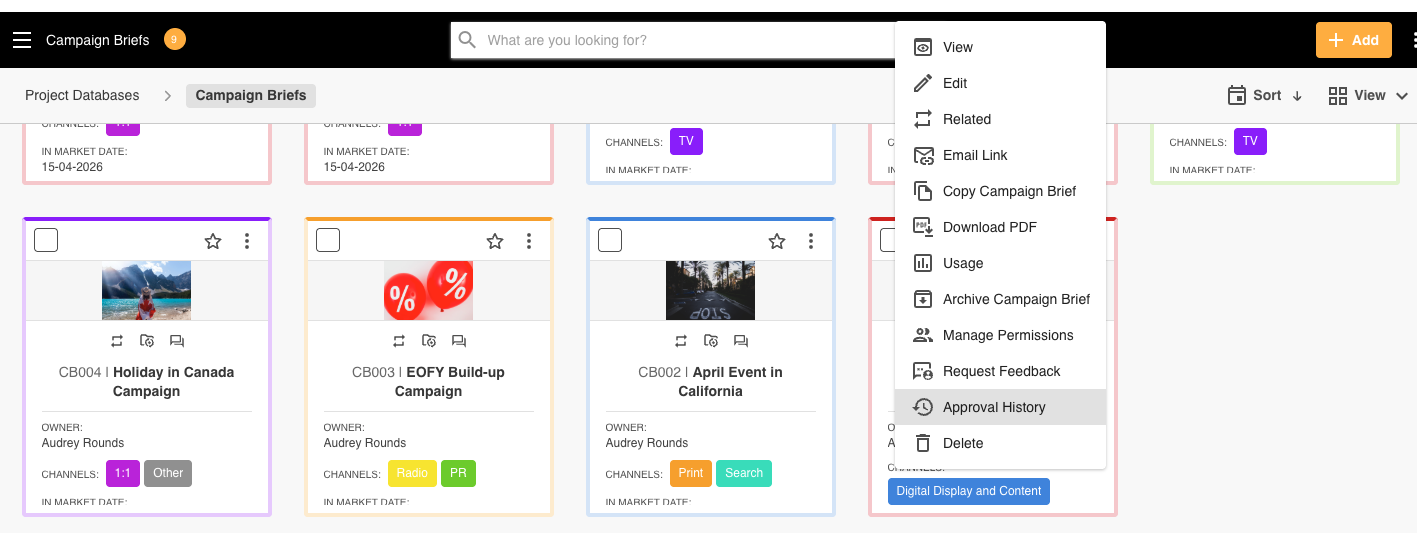
- Click the Three Dots Menu (⋮) on the upper right hand side of the brief record, then select Approval History on the actions menu.
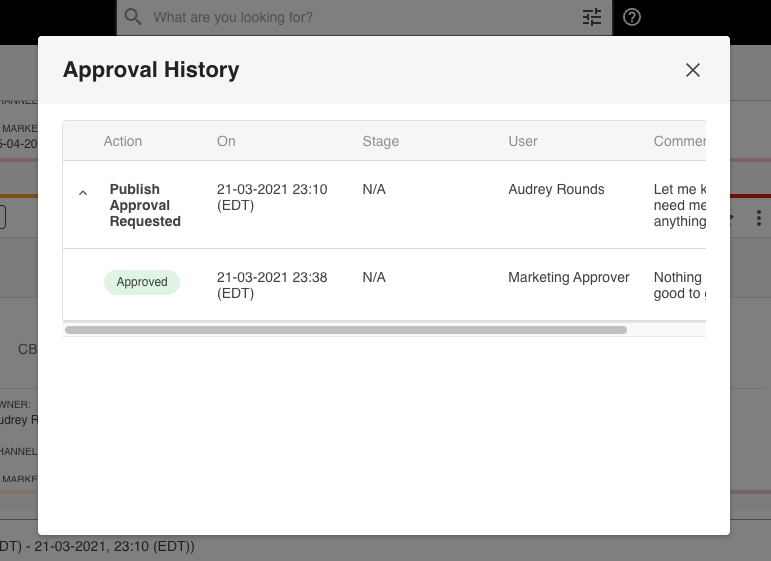
- This will bring up the history of approval, with the date and time the approval was requested, comments, and the reviewer’s response/comment/date of response
Note that you will be able to view a brief/form's Approval History if have a minimum of View permission on the brief/form and you are:
- The requestor
- The reviewer
- A Main Admin
- An Approval Admin
- A user who has Access permission to view approvals
Was this article helpful?
That’s Great!
Thank you for your feedback
Sorry! We couldn't be helpful
Thank you for your feedback
Feedback sent
We appreciate your effort and will try to fix the article