Banned Keywords prevent specific terms from being auto-tagged when uploading or editing an asset. This can be a helpful feature to utilise if there are certain keywords you'd prefer don't get generated and applied to your images or videos (ie: descriptors on age, appearance, gender, etc).
Main Admins can find the Banned Keyword list in Admin>Settings area under the Assets - Asset Intelligence section.
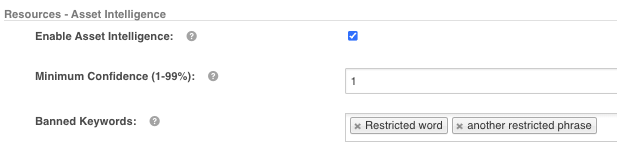
These restricted terms are applicable to both Image and Video Auto-tags. Should the auto-tagger detect a particular word or phrase, it will not apply it to the asset.
Note new keywords added to Banned Keywords may take up to 1hr to come into effect. Also note that users can still manually apply any keywords to assets that might be in the Banned Keywords section- this feature only restricts them via auto-tagging.
Related:
Was this article helpful?
That’s Great!
Thank you for your feedback
Sorry! We couldn't be helpful
Thank you for your feedback
Feedback sent
We appreciate your effort and will try to fix the article