Audio / Video Risk Reviews brings IntelligenceBank's compliance Risk Review to your video and audio content, so you can catch issues in both what is said and what is shown before you publish.
Table of Contents
What It Is
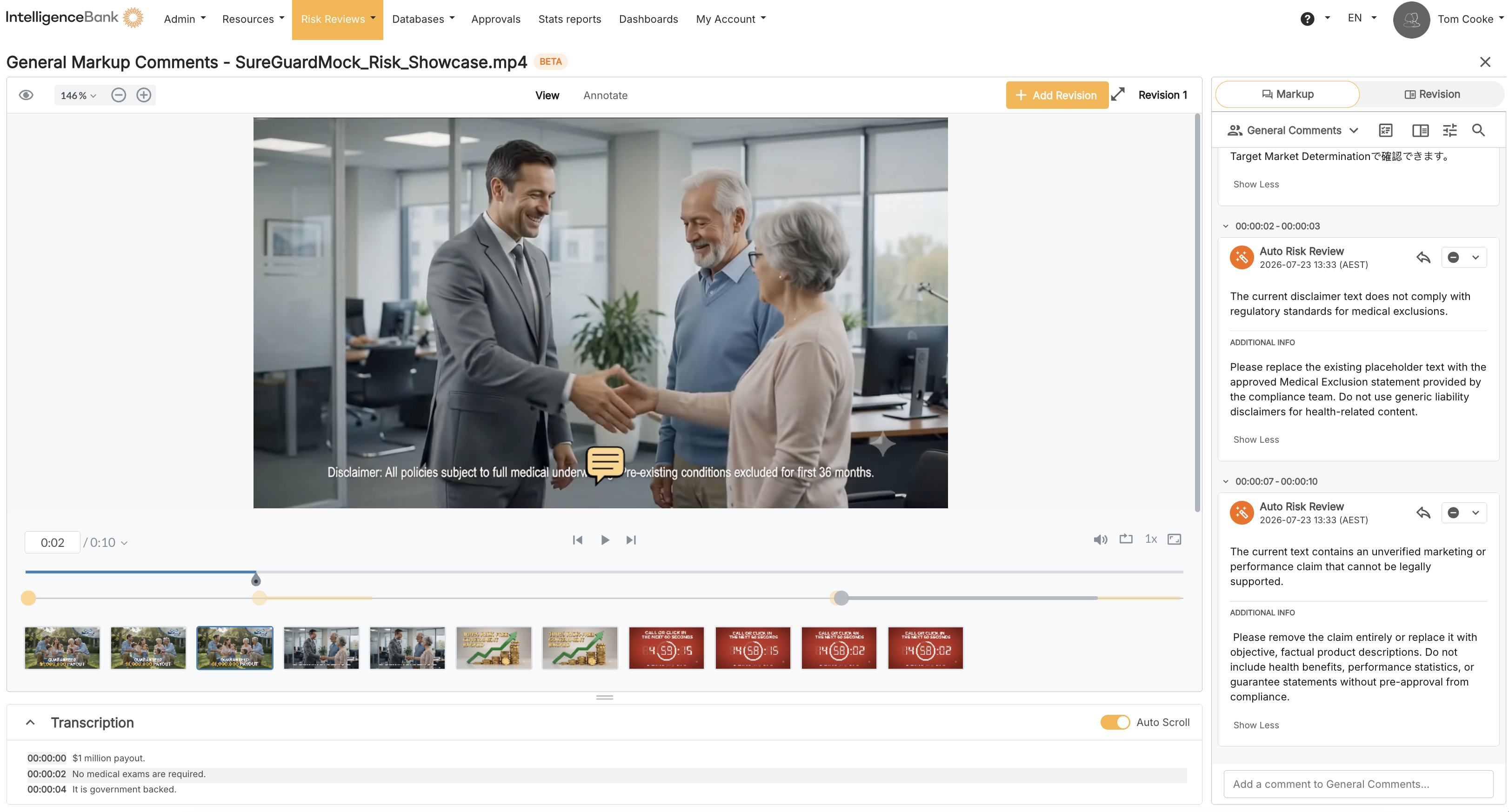
Audio / Video Risk Reviews extends the compliance Risk Review you already use for documents to your media files. You upload a video or audio file, IntelligenceBank reviews it, and any flagged risks appear in context against that file.
Click a flagged risk and the player jumps to the exact moment it occurs. For risks that appear on screen, the finding is pinned to the area of the frame where it was detected. It is the same "catch it before it is published" workflow you know from documents, now applied to media, in the same platform.
This is one feature, not two. Spoken-word and visual checks are part of the same review and can run together or on their own.
What It Reviews
A single review can check two things, together or separately:
| Check | What It Covers |
|---|---|
| What is said | The spoken words. IntelligenceBank produces a transcript and checks it for risky language, banned terms, missing or incorrect spoken disclaimers, and unsupported claims. |
| What is shown | What actually appears on screen. This includes on-screen text and disclaimers read directly from the video, pricing and terms, imagery and objects (for example alcohol or gambling content), and logos. |
Because both can run in one rule, you can also check relationships between them. For example, you can confirm that a disclaimer spoken aloud is also shown on screen, and that the wording matches.
Why It Helps
Reviewing media by hand is slow, and text-only checks miss anything that only appears on screen. By reviewing both the audio and the visuals, Audio / Video Risk Reviews surfaces issues that a transcript alone cannot, such as:
- A disclaimer that is shown on screen but never said out loud, or the reverse.
- A required disclaimer that appears for too short a time to be readable.
- A claim that is spoken without a supporting citation shown on screen.
- Prohibited imagery or an unexpected logo appearing in a frame.
Findings are grouped by where they occur in time, so your team can move straight to the moment that needs attention and action it before publishing.
Availability
| Capability | Status |
|---|---|
| Spoken-word review | Available now. |
| Visual (on-screen) review | Rolling out in Beta. |
| Supported files | Both video and audio files, not video only. |
Your Customer Success contact can confirm what is enabled for your account.
Need Help?
If you have questions about enabling or using Audio / Video Risk Reviews, contact your Customer Success representative or IntelligenceBank Support.
Contact SupportWas this article helpful?
That’s Great!
Thank you for your feedback
Sorry! We couldn't be helpful
Thank you for your feedback
Feedback sent
We appreciate your effort and will try to fix the article