Within the briefs/forms display, the sort order and layout can be amended to your individual preference. This lets you view the briefs/forms in an order/layout that is best suited for your workflow.
To adjust this, follow the steps below:
- Navigate to the briefs/forms in your platform and select the required one (not the individual record)
- Select the Switch layout icon in the upper right hand side of the page.
- Select the preferred layout options:
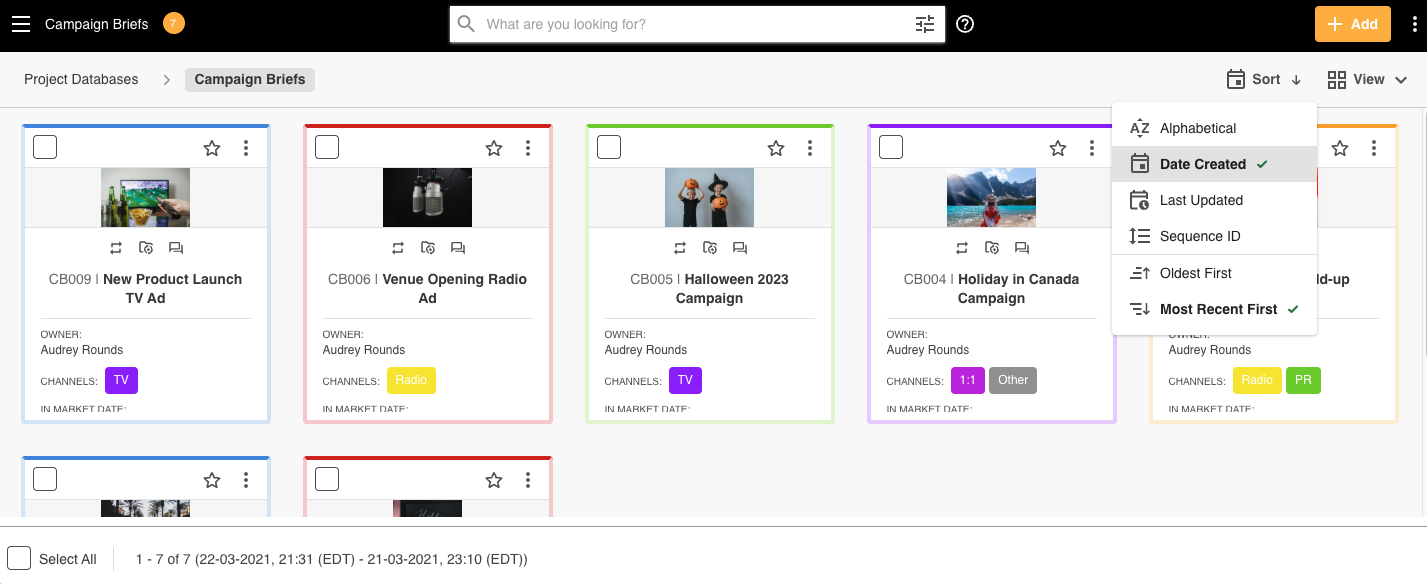
- Sort layout - display options*:
- Alphabetical - by title field (0-Z by default- you can choose to sort of the opposite way)
- Date Created - original creation date (oldest to newest by default- you can choose to sort the opposite way)
- Last Updated - original creation or edited date (most recent to oldest by default- you can choose to sort the opposite way)
- Sequence ID - brief/form unique identifier (this will display as an option if your brief/form is utilising Sequence IDs)
- Switch layout - display options:
- List - single page view of individual records
- Card - thumbnail page view of individual records
- Calendar - calendar page view by day, week, month, quarter or annual options
- Kanban - board page view by predefined options i.e. status, assignee, priority and/or task
- Sort layout - display options*:
*Note:
- There is no requirement to Save
- Users can switch between the display options as preferred
- The layout will remain applied for any future activities whilst logged in the same session
- The layout does not become your default
- Calendar view does not have sort options
- Kanban view includes a "Custom" view, which allows Admins to manually resort their briefs/forms within each Kanban column by priority or other custom criteria. Please review the article here if you'd like to learn more about this feature.
Further information - click here
Was this article helpful?
That’s Great!
Thank you for your feedback
Sorry! We couldn't be helpful
Thank you for your feedback
Feedback sent
We appreciate your effort and will try to fix the article